
Figure 1 : maths / relational functions
Arguments, results and a data-stack
Integer and Fixed-point numbers
Testing
Negate
Addition
Addition fixed-point
Accumulate
Subtraction
Subtraction fixed-point
Multiplication
Multiplication fixed-point
Hardware multiplication 8bit and 16bit
Division
Division fixed-point
Relational operators
Relational operators fixed-points
To test the new simpleCPUv1d2's instruction-set i decided to write some maths routines to go with it e.g. neg, add, sub, mul and div etc. There are a number of different ways to implement these routines: different algorithms, different data types and different ways of passing parameters / results e.g. register/memory/stack, between the caller and callee code. This processor is a 16bit machine so the base data type is a 16bit signed / unsigned integer. However, to give a bit of flexibility also going to support 32bit signed / unsigned values. This allows bigger values to be represented and smaller values e.g. a Q16.16 fixed point representation.
For most programming cases we don't need to worry about nested subroutines, we don't need to worry about recursive algorithms. Sooo for the simple tasks i'm going to keep things simple and use 16bit operands i.e. 16bit arguments and results, that are passed via variables in memory, as shown below:
# 16bit arguments and results

W:
  .data 0      # input
X:
  .data 0      # input
Y:
  .data 0      # output
Z:
  .data 0      # output
CNT:
  .data 0      # bit count, working variable for different algorithms
To also support 32bit arguments we will need to double the size of these variables i.e. 32bit values will be stored across two 16bit memory locations, sooo:
# 16bit and 32bit arguments and results

W:
W_LOW:
  .data 0                        # input argument
W_HIGH:
  .data 0                        # input argument

X:
X_LOW:
  .data 0                        # input argument
X_HIGH:
  .data 0                        # input argument

Y:
Y_LOW:
  .data 0                        # output result
Y_HIGH:
  .data 0                        # output result

Z:
Z_LOW:
  .data 0                        # output result
Z_HIGH:
  .data 0                        # output result

CNT:
  .data 0                        # bit count, working variable for different algorithms

TMP:
TMP_0
TMP_LOW:
  .data 0                        # temp buffer variables
TMP_1
TMP_HIGH:
  .data 0
TMP_2:
  .data 0
TMP_3:
  .data 0
Ideally these variables should be stored in the first 255 memory locations to simplify address pointer calculations e.g. the generation of the addresses of W+1, X+1, Y+1 and Z+1. Storing values in named memory locations is an ok solution as long as you don't have more than two arguments and you don't have nested subroutines i.e. subroutines that call other subroutines, that also use these variables, that will overwrite these variables, corrupting the caller subroutine's state. A good example of this would be a recursive algorithm. Therefore, in these cases we need to implement a data-stack in memory, as shown in figure 2.
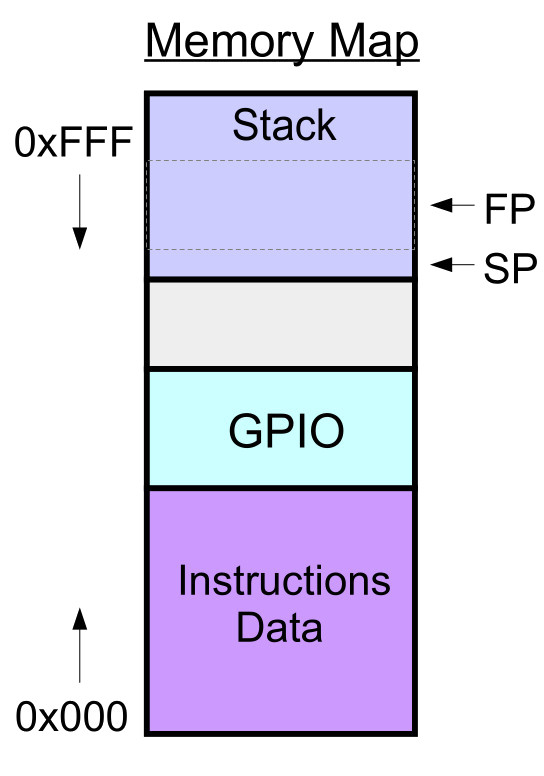
Figure 2 : data stack
To control where data is written to / read from this stack we will need a Stack Pointer (SP) and a Frame Pointer (FP). These could be stored in general purpose registers, but as we only have four data registers, loosing 50% of our registers is a bit of a big hit, sooo these pointers will be implemented as variables in memory. To simplify coding I also define the stack depth i.e. its start and stop addresses in memory. For this example i have selected 0xEFF to 0xE00, 256 memory locations. Therefore, the stack grows downwards i.e. if SP=0xEFF and you push data onto the stack pointer is updated to SP=0xEFE. Therefore, our final list of variables will be:
# 16bit, 32bit and Stack arguments and results

W:
W_LOW:
  .data 0                        # input argument
W_HIGH:
  .data 0                        # input argument

X:
X_LOW:
  .data 0                        # input argument
X_HIGH:
  .data 0                        # input argument

Y:
Y_LOW:
  .data 0                        # output result
Y_HIGH:
  .data 0                        # output result

Z:
Z_LOW:
  .data 0                        # output result
Z_HIGH:
  .data 0                        # output result

CNT:
  .data 0                        # bit count, working variable for different algorithms

TMP:
TMP_0
TMP_LOW:
  .data 0                        # temp buffer variables
TMP_1
TMP_HIGH:
  .data 0
TMP_2:
  .data 0
TMP_3:
  .data 0

STACK_START_ADDRESS:
  .data 0xEFF                    # stack start address

STACK_STOP_ADDRESS:
  .data 0xE00                    # stack stop address

STACK_POINTER:
  .data 0xEFF                    # stack pointer

FRAME_POINTER:
  .data 0xEFF                    # frame pointer
To implement this data stack's functions we can use the subroutines below. However, do remember that the subroutine return addresses are stored in the LILO_12 component, are stored in the processor's internal hardware implemented CALL/RET stack. The stack in memory is only used to store arguments (data to be processed) and results.
#####################
# STACK SUBROUTINES #
#####################

# STACK register usage
# RA, RB temporary working registers, will be changed e.g. address / data calculations
# RC, RD data registers, contain data to be written to stack or read from stack

# STACK - initialise pointers

stack_init:
  load ra STACK_START_ADDRESS       # top of stack address defined as constant
  store ra STACK_POINTER            # copy to stack pointer
  store ra FRAME_POINTER            # copy to frame pointer
  ret

# STACK - increment stack pointer with empty check

inc_stack_pointer:
  load ra STACK_POINTER             # test limit
  subm ra STACK_START_ADDRESS
  jumpz inc_stack_pointer_exit

  load ra STACK_POINTER             # inc stack pointer
  add ra 1
  store ra STACK_POINTER
inc_stack_pointer_exit:
  ret

# STACK - decrement stack pointer with full check

dec_stack_pointer:
  load ra STACK_POINTER             # test limit
  subm ra STACK_STOP_ADDRESS
  jumpz dec_stack_pointer_exit

  load ra STACK_POINTER             # dec stack pointer
  sub ra 1
  store ra STACK_POINTER
dec_stack_pointer_exit:
  ret

# STACK - get stack pointer

get_stack_pointer:
  load ra STACK_POINTER             # RB = STACK_POINTER
  move rb ra
  ret

get_dec_stack_pointer:
  call dec_stack_pointer            # dec SP
  move rb ra                        # RB = STACK_POINTER
  ret

get_inc_stack_pointer:
  call inc_stack_pointer            # inc SP
  move rb ra                        # RB = STACK_POINTER
  ret

# PUSH - write 16bit value to stack

push16:
  call get_stack_pointer            # SP returned in RB
  store rc (rb)                     # write data to top of stack
  call dec_stack_pointer            # decrement stack pointer
  ret

# PUSH - write 32bit value to stack

push32:
  call get_stack_pointer            # SP returned in RB
  store rd (rb)                     # write data to top of stack (high 16bit)
  call get_dec_stack_pointer        # dec SP, SP returned in RB
  store rc (rb)                     # write data to top of stack (low 16bit)
  call dec_stack_pointer            # dec SP
  ret

# POP - read 16bit value from stack

pop16:
  call get_inc_stack_pointer        # inc SP, SP returned in RB
  load rc (rb)                      # read data from top of stack
  ret

# POP - read 32bit value from stack

pop32:
  call get_inc_stack_pointer        # SP returned in RB
  load rc (rb)                      # read data from top of stack (low 16bit)
  call get_inc_stack_pointer        # inc SP, SP returned in RB
  load rd (rb)                      # read data from top of stack (high 16bit)
  ret

# STACK - subroutine enter function

stack_subroutine_enter:
  call get_stack_pointer            # SP returned in RB
  load ra FRAME_POINTER             # read FP
  store ra (rb)                     # write data to top of stack
  move ra rb
  store ra FRAME_POINTER            # FP=SP
  call dec_stack_pointer            # dec SP
  ret

# STACK - subroutine exit function

stack_subroutine_exit:
  load ra FRAME_POINTER             # set SP=FP
  store ra STACK_POINTER
  load ra (ra)                      # set FP=OLD_FP
  store ra FRAME_POINTER
  ret

# STACK - remove arguments passed on stack

stack_remove_arguments:
  call inc_stack_pointer
  sub rc 1
  jumpnz stack_remove_arguments
  ret
When you think of a computer you naturally think of a binary representations, base 2. Each binary digit being called a "bit", the more bits you have the bigger the value you can represent. To represent smaller values we can move the decimal point, go to a fixed-point representation and use the negative powers of 2 e.g. the Q4.4 representation shown in figure 3, a 4bit integer term and a 4bit fractional term.
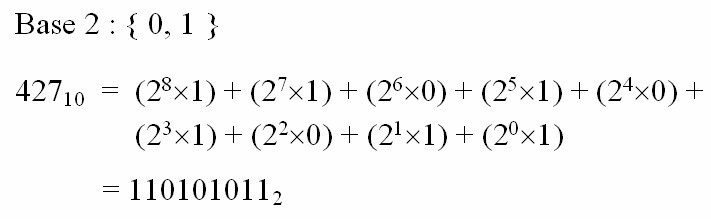
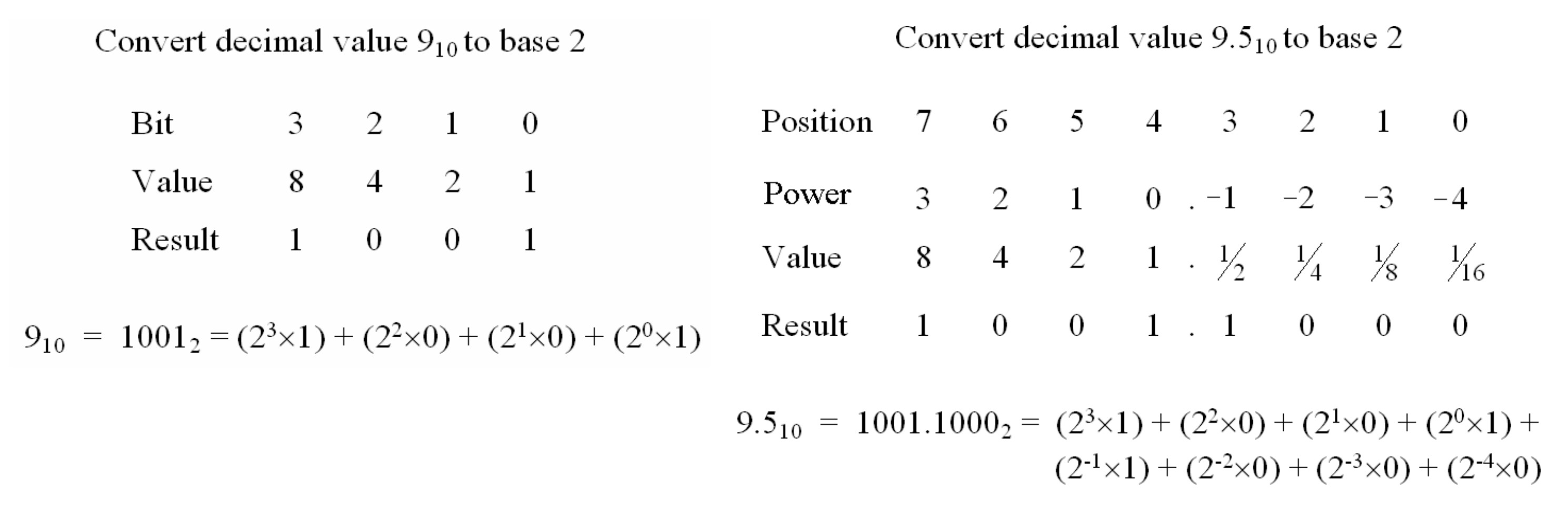
Figure 3 : Binary representation (top), fixed-point (bottom)
To represent negative numbers we can use a 2s complemented representation i.e. signed and unsigned values, soooo, that allows us to represent:
16BIT
-----
integer signed            : MIN = −32768  MAX = +32767
integer unsigned          : MIN = 0       MAX = +65535
fixed-point Q8.8 signed   : MIN = −128    MAX = +127.99609375  Resolution = 0.00390625
fixed-point Q8.8 unsigned : MIN = 0       MAX = +255.99609375  Resolution = 0.00390625

32BIT
-----
integer signed              : MIN = −2,147,483,648  MAX = +2,147,483,647
integer unsigned            : MIN = 0               MAX = +4,294,967,295
fixed-point Q16.16 signed   : MIN = −32768          MAX = +32767.9999847412  Resolution = 0.0000152587890625
fixed-point Q16.16 unsigned : MIN = 0               MAX = +65535.9999847412  Resolution = 0.0000152587890625
The 32bit data type The good thing about using a fixed-point representation is that were can use the existing hardware i.e. adders, registers etc, so they are fast. The bad thing about using a fixed-point representation is its limited range. The decimal of each bit position of the Q16.16 number are listed in the table below:
| N (bit position) | Integer (2^N) | Fractional (2^-N) |
|---|---|---|
| 0 | 1 | - |
| 1 | 2 | 0.5 |
| 2 | 4 | 0.25 |
| 3 | 8 | 0.125 |
| 4 | 16 | 0.0625 |
| 5 | 32 | 0.03125 |
| 6 | 64 | 0.015625 |
| 7 | 128 | 0.0078125 |
| 8 | 256 | 0.00390625 |
| 9 | 512 | 0.001953125 |
| 10 | 1024 | 0.0009765625 |
| 11 | 2048 | 0.00048828125 |
| 12 | 4096 | 0.000244140625 |
| 13 | 8192 | 0.0001220703125 |
| 14 | 16384 | 0.00006103515625 |
| 15 | 32768 | 0.000030517578125 |
| 16 | - | 0.0000152587890625 |
These value can be used in the python program below to help calculate our fixed point numbers e.g. the example in figure 4 shows how the fixed-point value for 123.45 can be calculated, well the value 123.449, as there will be rounding errors, well a quantisation error, the fixed-point value is rounded "nearest" fixed-point step. The values calculated by this code can be dumped to the terminal for cut-and-paste, or to a file: fp_value.txt, when the Save button is pressed.
import tkinter as tk

INT_BITS = [2**i for i in range(16)]       # 2^0 .. 2^15
FRAC_BITS = [2**(-i) for i in range(1,17)] # 2^-1 .. 2^-16

class FixedPointGUI:
    def __init__(self, root):
        self.root = root
        root.title("Fixed‑Point Bit Viewer")

        self.int_vars = []
        self.frac_vars = []

        tk.Label(root, text="Fixed‑Point Bit Viewer", font=("Arial", 16)).pack(pady=10)

        frame_int = tk.LabelFrame(root, text="Integer Bits (15..0)", padx=10, pady=10)
        frame_frac = tk.LabelFrame(root, text="Fractional Bits (−1..−16)", padx=10, pady=10)
        frame_int.pack(padx=10, pady=5)
        frame_frac.pack(padx=10, pady=5)

        # Integer bit checkboxes (bit 15 down to bit 0)
        for i in reversed(range(16)):
            var = tk.IntVar()
            chk = tk.Checkbutton(frame_int, text=f"{i}", variable=var,
                                 command=self.update_value)
            chk.grid(row=0, column=15 - i, padx=3)
            self.int_vars.append(var)

        # Fractional bit checkboxes (bit −1 down to −16)
        for i in range(16):
            var = tk.IntVar()
            chk = tk.Checkbutton(frame_frac, text=f"-{i+1}", variable=var,
                                 command=self.update_value)
            chk.grid(row=0, column=i, padx=3)
            self.frac_vars.append(var)

        # Output labels
        self.value_label = tk.Label(root, text="Decimal: 0.0", font=("Arial", 14))
        self.binary_label = tk.Label(root, text="Binary: 0000000000000000.0000000000000000", font=("Courier", 12))
        self.hex_label = tk.Label(root, text="Hex: 0x00000000", font=("Courier", 12))

        self.value_label.pack(pady=5)
        self.binary_label.pack(pady=5)
        self.hex_label.pack(pady=5)

        # Save button
        save_button = tk.Button(root, text="Save to File", command=self.save_to_file, font=("Arial", 12))
        save_button.pack(pady=10)

        # Internal storage for last values
        self.last_decimal = 0.0
        self.last_binary = "0" * 16 + "." + "0" * 16
        self.last_hex = "0x00000000"

    # Calc Value
    def update_value(self):
        value = 0.0

        # Integer part
        for var, weight in zip(reversed(self.int_vars), INT_BITS):
            if var.get() == 1:
                value += weight

        # Fractional part
        for var, weight in zip(self.frac_vars, FRAC_BITS):
            if var.get() == 1:
                value += weight

        # Update decimal
        self.last_decimal = value
        self.value_label.config(text=f"Decimal: {value}")

        # Build binary string
        int_bits = "".join(str(v.get()) for v in self.int_vars)
        frac_bits = "".join(str(v.get()) for v in self.frac_vars)
        binary_str = int_bits + "." + frac_bits

        self.last_binary = binary_str
        self.binary_label.config(text=f"Binary: {binary_str}")

        # Convert to 32‑bit integer (Q16.16)
        int_value = 0

        # Integer bits (bit 31..16)
        for i, var in enumerate(self.int_vars):
            if var.get() == 1:
                int_value |= (1 << (31 - i))

        # Fractional bits (bit 15..0)
        for i, var in enumerate(self.frac_vars):
            if var.get() == 1:
                int_value |= (1 << (15 - i))

        hex_str = f"0x{int_value:08X}"
        self.last_hex = hex_str
        self.hex_label.config(text=f"Hex: {hex_str}")

    # Save values to file
    def save_to_file(self):
        print(f"Decimal: {self.last_decimal}\n")
        print(f"Binary:  {self.last_binary}\n")
        print(f"Hex:     {self.last_hex}\n")
        with open("fp_value.txt", "w") as f:
            f.write(f"Decimal: {self.last_decimal}\n")
            f.write(f"Binary:  {self.last_binary}\n")
            f.write(f"Hex:     {self.last_hex}\n")

# Start GUI
root = tk.Tk()
app = FixedPointGUI(root)
root.mainloop()
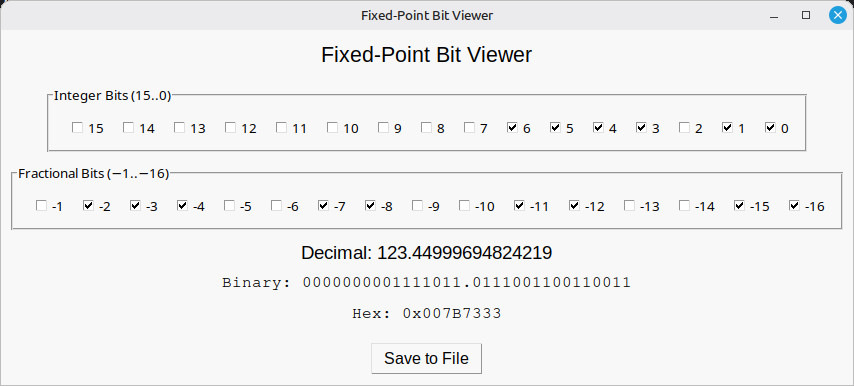
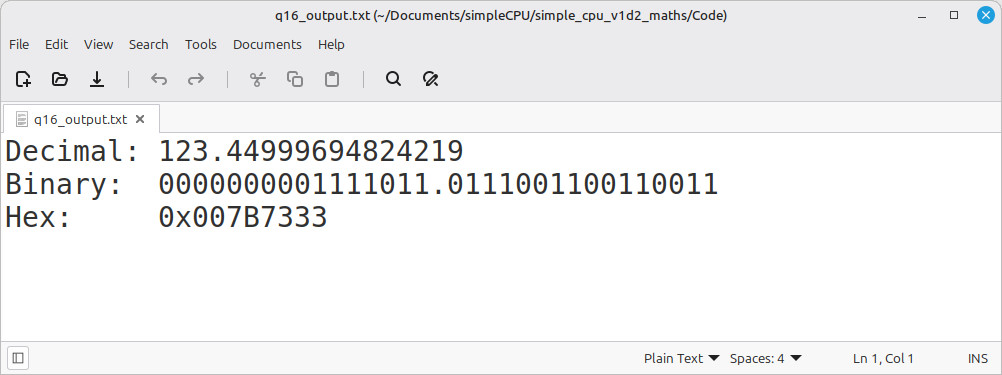
Figure 4 : Fixed point number calculator (top), output file (bottom)
Testing software is always a joy, but its a doubly fun when its written in assembler :). Confess, so some tasks i do just sit down and code, but even then you always hit that point where something does not work, in these cases you need to write code to test your code, rather than just random guesses. Sooooo, for these subroutine we need a framework to pass arguments can test results. This will vary depending on subroutine, but as an example consider the neg subroutines in the next section, these will be passed one argument and return one result sooo:
###################
# TEST CODE 16bit #
###################

start:
  jump test               # test code
fail:
  jump fail               # if simulation finished with address 1 = failed test
pass:
  jump pass               # if simulation finished with address 2 = passed test
trap:
  jump trap               # debug

data_ptr:
  .data data              # index into array
data_stop_pntr:
  .data data_end          # address of end of array

data:
  .data 0x0000            # test data 0=0
  .data 0x0000            # result
  .data 0xFFFF            # test data -1=1
  .data 0x0001            # result
  .data 0x0001            # test data 1=-1
  .data 0xFFFF            # result
  .data 0x00FF            # test data 255=-255
  .data 0xFF01            # result
data_end:
  .data 0                 # finished

test:
  load ra data_ptr        # read address of data
  load ra (ra)            # read data
  store ra W              # store in working variable
  store ra 0xFFF          # print to screen

  call neg16              # process data

  load ra data_ptr        # read address of data
  add ra 1                # increment
  store ra data_ptr
  load ra (ra)            # read test result
  move rb ra

  load ra Y               # read code result
  store ra 0xFFF          # print to screen
  sub rb ra               # equal?
  jumpnz fail             # no, stop fail

  load ra data_ptr        # yes, inc pntr
  add ra 1
  store ra data_ptr
  subm ra data_stop_pntr  # have all tests been performed?
  jumpz pass              # yes, pass

  jump test               # no, repeat
Run this program for 100us, if all is fine the code will be trapped in an infinite loop at address 2, if a test fails it will enter an infinite loop at address 1. This is very easy to see in the simulation. However, if it does fail how can you tell what test failed? That where the writing to address 0xFFF comes in. Within the VHDL test bench there is a monitor process (shown below) that whats for data to be written to address 0xFFF, when it is this value is printed to the simulation terminal, as shown in figure 5.
monitor : PROCESS( ADDR, DATA_OUT, RAM_WR )
  VARIABLE L : line;
BEGIN
  if RAM_WR'event and RAM_WR='1'
  then
    if ADDR=x"FFF"
    then
      RESULT <= DATA_OUT;
      write(L, now);
      write(L, string'(" : DATA = "));
      write(L, DATA_OUT);
      write(L, string'(" = "));
      write(L, integer'image(to_integer(unsigned(DATA_OUT))));
      writeline(output, L);
    end if;
  end if;
END PROCESS;
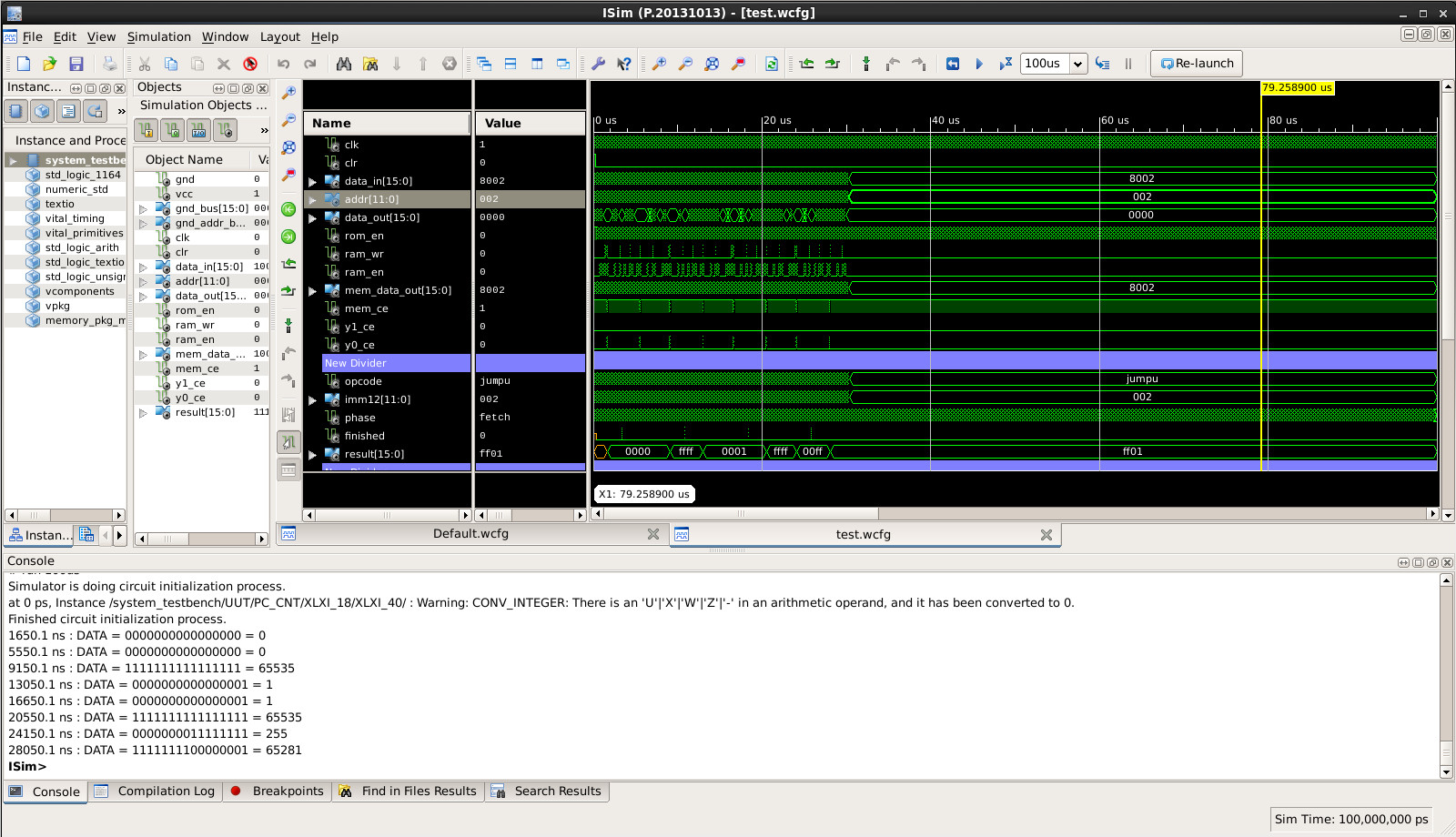
Figure 5 : Simulation debug messages
To convert positive numbers into negative numbers and vice-versa we use 2's complement i.e. invert the bits and add 1. To invert each bit position we could use the XOR instruction, alternatively we can use the subtract instruction, as shown in figure 6. Subtracting the value to be converted from an all 1s value will invert each bit i.e. 1-1=0 and 1-0=1. Then add 1 to the result.
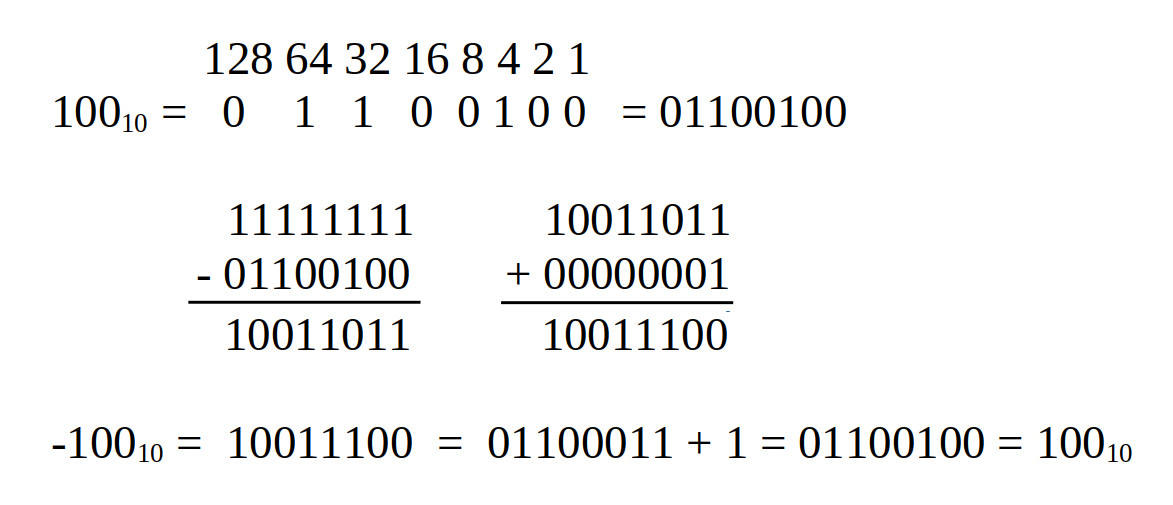
Figure 6 : 16-bit 2's complement
Test code for 16bit values stored in variables:
#################################
# TEST CODE : VARIABLES - 16bit #
#################################

start:
  jump test               # test code
fail:
  jump fail               # if simulation finished with address 1 = failed test
pass:
  jump pass               # if simulation finished with address 2 = passed test
trap:
  jump trap               # debug

data_ptr:
  .data data              # index into array
data_stop_pntr:
  .data data_end          # address of end of array

data:
  .data 0x0000            # test data 0=0
  .data 0x0000            # result
  .data 0xFFFF            # test data -1=1
  .data 0x0001            # result
  .data 0x0001            # test data 1=-1
  .data 0xFFFF            # result
  .data 0x00FF            # test data 255=-255
  .data 0xFF01            # result
data_end:
  .data 0                 # finished

test:
  load ra data_ptr        # read address of data
  load ra (ra)            # read data
  store ra W              # store in working variable
  store ra 0xFFF          # print INPUT to screen

  call neg16              # process data

  load ra data_ptr        # read address of data
  add ra 1                # increment
  store ra data_ptr
  load ra (ra)            # read test result
  move rb ra

  load ra Y               # read code result
  store ra 0xFFF          # print OUTPUT to screen
  sub rb ra               # equal?
  jumpnz fail             # no, stop fail

  load ra data_ptr        # yes, inc pntr
  add ra 1
  store ra data_ptr
  subm ra data_stop_pntr  # have all tests been performed?
  jumpz pass              # yes, pass

  jump test               # no, repeat

###################
# NEG SUBROUTINES #
###################

# description: negate 16bit data
# result (16bit) = Y (16bit) <= -W (16bit)
# input: W (operand)
# output: Y (result)

neg16:
  move ra 0xFF   # set RA to 0xFFFF
  subm ra W      # subtract data to invert
  add ra 1       # increment
  store ra Y     # save result
  ret
Test code for 32bit values stored in variables:
#################################
# TEST CODE : VARIABLES - 32bit #
#################################

start:
  jump test               # test code
fail:
  jump fail               # if simulation finished with address 1 = failed test
pass:
  jump pass               # if simulation finished with address 2 = passed test
trap:
  jump trap               # debug

data_ptr:
  .data data              # index into array
data_stop_pntr:
  .data data_end          # address of end of array

data:
  .data 0x0000            # test data 0=0
  .data 0x0000
  .data 0x0000            # result
  .data 0x0000
  .data 0xFFFF            # test data -1=1
  .data 0xFFFF
  .data 0x0001            # result
  .data 0x0000
  .data 0x0001            # test data 1=-1
  .data 0x0000
  .data 0xFFFF            # result
  .data 0xFFFF
  .data 0x00FF            # test data 255=-255
  .data 0x0000
  .data 0xFF01            # result
  .data 0xFFFF
data_end:
  .data 0                 # finished

test:
  load ra data_ptr        # read address of data
  load ra (ra)            # read data
  store ra W_LOW          # store in working variable
  store ra 0xFFF          # print INPUT LOW to screen
  load ra data_ptr        # read address of data
  add ra 1                # increment
  store ra data_ptr
  load ra (ra)            # read data
  store ra W_HIGH         # store in working variable
  store ra 0xFFF          # print INPUT HIGH to screen

  call neg32              # process data

  load ra data_ptr        # read address of data
  add ra 1                # increment
  store ra data_ptr
  load ra (ra)            # read test result
  move rb ra

  load ra Y_LOW           # read code result
  store ra 0xFFF          # print OUTPUT LOW to screen
  sub rb ra               # equal?
  jumpnz fail             # no, stop fail

  load ra data_ptr        # read address of data
  add ra 1                # increment
  store ra data_ptr
  load ra (ra)            # read test result
  move rb ra

  load ra Y_HIGH           # read code result
  store ra 0xFFF          # print OUTPUT HIGH to screen
  sub rb ra               # equal?
  jumpnz fail             # no, stop fail

  load ra data_ptr        # yes, inc pntr
  add ra 1
  store ra data_ptr
  subm ra data_stop_pntr  # have all tests been performed?
  jumpz pass              # yes, pass

  jump test               # no, repeat

###################
# NEG SUBROUTINES #
###################

# description: negate 32bit data
# result (32bit) = Y_HIGH (16bit) || Y_LOW (16bit) <= -( W_HIGH (16bit) || W_LOW (16bit) )
# input: W_HIGH (operand), W_LOW (operand)
# output: Y_HIGH (result), Y_LOW (result)

neg32:
  move ra 0xFF       # set RA to 0xFFFF
  subm ra W_HIGH     # subtract data to invert
  store ra Y_HIGH
  move ra 0xFF       # set RA to all 1s i.e. 0xFF sign extended to 0xFFFF
  subm ra W_LOW      # subtract data to invert
  add ra 1
  store ra Y_LOW     # write low word
  move ra 0
  addmc ra Y_HIGH
  store ra Y_HIGH    # write high word
  ret
Stack based solution, 16bit arguments and results are transferred between the caller and callee via the stack:
#############################
# TEST CODE : STACK - 16bit #
#############################

start:
  jump test               # test code
fail:
  jump fail               # if simulation finished with address 1 = failed test
pass:
  jump pass               # if simulation finished with address 2 = passed test
trap:
  jump trap               # debug

data_ptr:
  .data data              # index into array
data_stop_pntr:
  .data data_end          # address of end of array

data:
  .data 0x0000            # test data 0=0
  .data 0x0000            # result
  .data 0xFFFF            # test data -1=1
  .data 0x0001            # result
  .data 0x0001            # test data 1=-1
  .data 0xFFFF            # result
  .data 0x00FF            # test data 255=-255
  .data 0xFF01            # result
data_end:
  .data 0                 # finished

#  ------------
#  |    RC    |    FP+1   INPUT
#  ------------
#  |    FP    |
#  ------------

test:
  load ra data_ptr        # read address of data
  load ra (ra)            # read data
  store ra 0xFFF          # print INPUT to screen
  move rc ra
  call push16

  call neg16_stack        # process data
  call pop16              # pop results off stack

  move ra rc
  store ra 0xFFF          # print OUTPUT to screen

  load ra data_ptr        # read address of data
  add ra 1                # increment
  store ra data_ptr
  load ra (ra)            # read test result
  sub rc ra               # equal?
  jumpnz fail             # no, stop fail

  load ra data_ptr        # yes, inc pntr
  add ra 1
  store ra data_ptr
  subm ra data_stop_pntr  # have all tests been performed?
  jumpz pass              # yes, pass

  jump test               # no, repeat

###################
# NEG SUBROUTINES #
###################

# description: negate 16bit data
# result = FP+1 (16bit) <= -(FP+1) (16bit)
# input: FP+1 (operand)
# output: FP+1 (result)
# caller clean-up : 0

neg16_stack:
  call stack_subroutine_enter

  load ra FRAME_POINTER        # push old FP to stack, update FP and SP
  add ra 1
  load rc (ra)                 # read data from stack FP+1
  move rd 0xFF
  sub rd rc                    # invert
  add rd 1                     # add 1
  store rd (ra)                # write data to stack FP+1

  call stack_subroutine_exit   # pop old FP off stack, update FP and SP
  ret
Stack based solution, 32bit arguments and results are transferred between the caller and callee via the stack:
#############################
# TEST CODE : STACK - 32bit #
#############################

start:
  jump test               # test code
fail:
  jump fail               # if simulation finished with address 1 = failed test
pass:
  jump pass               # if simulation finished with address 2 = passed test
trap:
  jump trap               # debug

data_ptr:
  .data data              # index into array
data_stop_pntr:
  .data data_end          # address of end of array

data:
  .data 0x0000            # test data 0=0
  .data 0x0000
  .data 0x0000            # result
  .data 0x0000
  .data 0xFFFF            # test data -1=1
  .data 0xFFFF
  .data 0x0001            # result
  .data 0x0000
  .data 0x0001            # test data 1=-1
  .data 0x0000
  .data 0xFFFF            # result
  .data 0xFFFF
  .data 0x00FF            # test data 255=-255
  .data 0x0000
  .data 0xFF01            # result
  .data 0xFFFF
data_end:
  .data 0                 # finished

#  ------------
#  |    RD    |    FP+2   INPUT HIGH
#  ------------
#  |    RC    |    FP+1   INPUT LOW
#  ------------
#  |    FP    |
#  ------------

test:
  load ra data_ptr        # read address of data
  load ra (ra)            # read data
  store ra 0xFFF          # print INPUT LOW to screen
  move rc ra

  load ra data_ptr        # read address of data
  add ra 1                # increment
  store ra data_ptr
  load ra (ra)            # read test result
  store ra 0xFFF          # print INPUT HIGH to screen
  move rd ra

  call push32             # push data onto stack
  call neg32_stack        # process data
  call pop32              # pop results off stack

  move ra rc              # print OUTPUT LOW to screen
  store ra 0xFFF
  move ra rd              # print OUTPUT HIGH to screen
  store ra 0xFFF

  load ra data_ptr        # read address of data
  add ra 1                # increment
  store ra data_ptr
  load ra (ra)            # read test result low
  sub rc ra               # equal?
  jumpnz fail             # no, stop fail

  load ra data_ptr        # read address of data
  add ra 1                # increment
  store ra data_ptr
  load ra (ra)            # read test result high
  sub rd ra               # equal?
  jumpnz fail             # no, stop fail

  load ra data_ptr        # yes, inc pntr
  add ra 1
  store ra data_ptr
  subm ra data_stop_pntr  # have all tests been performed?
  jumpz pass              # yes, pass

  jump test               # no, repeat

###################
# NEG SUBROUTINES #
###################

# description: negate 32bit data
# result (32bit) = FP+2 (16bit) || FP+1 (16bit) <= -( FP+2 (16bit) || FP+1 (16bit) )
# input: (high operand) FP+2, FP+1 (low operand)
# output: (high result) FP+2, FP+1 (low result)
# caller clean-up : 0

neg32_stack:
  call stack_subroutine_enter  # push old FP to stack, update FP and SP

  load ra FRAME_POINTER        # read arguments into RC and RD
  add ra 1
  load rc (ra)                 # read low data from stack FP+1
  add ra 1
  load rd (ra)                 # read high data from stack FP+2

  move ra 0xFF                 # set RA to 0xFFFF
  sub ra rc                    # subtract low data to invert
  move rc ra

  move ra 0xFF                 # set RA to 0xFFFF
  sub ra rd                    # subtract high data to invert
  move rd ra

  add rc 1                     # add 1
  addc rd 0

  load ra FRAME_POINTER        # save result to stack
  add ra 1
  store rc (ra)
  add ra 1
  store rd (ra)

  call stack_subroutine_exit   # pop old FP off stack, update FP and SP
  ret
A key thing to note between these two implementations i.e. passing arguments / results using variables or stack, is the significant difference in processing times, as shown in figure 7. If the processor is running at 10MHz, the 16bit variable implementation takes approx 3us, whilst the 16bit stack implementations takes approx 20us, sooo is about seven times slower. This is the cost of recursion / nested subroutines, so deciding when and where to use, or not use the stack can increase processing performance.
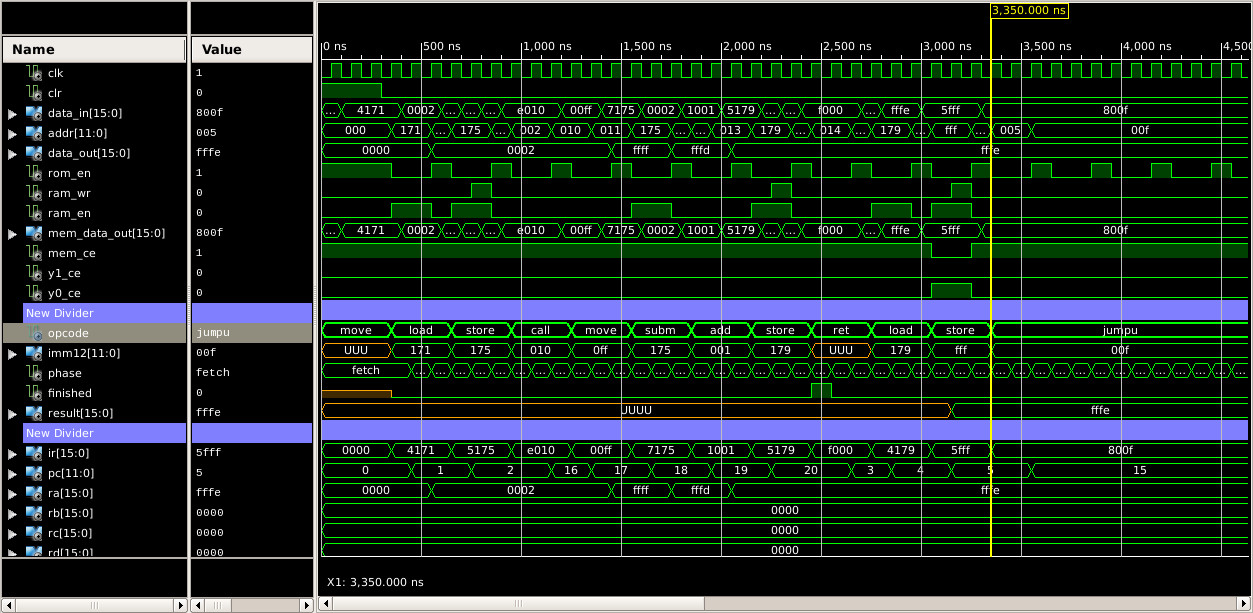
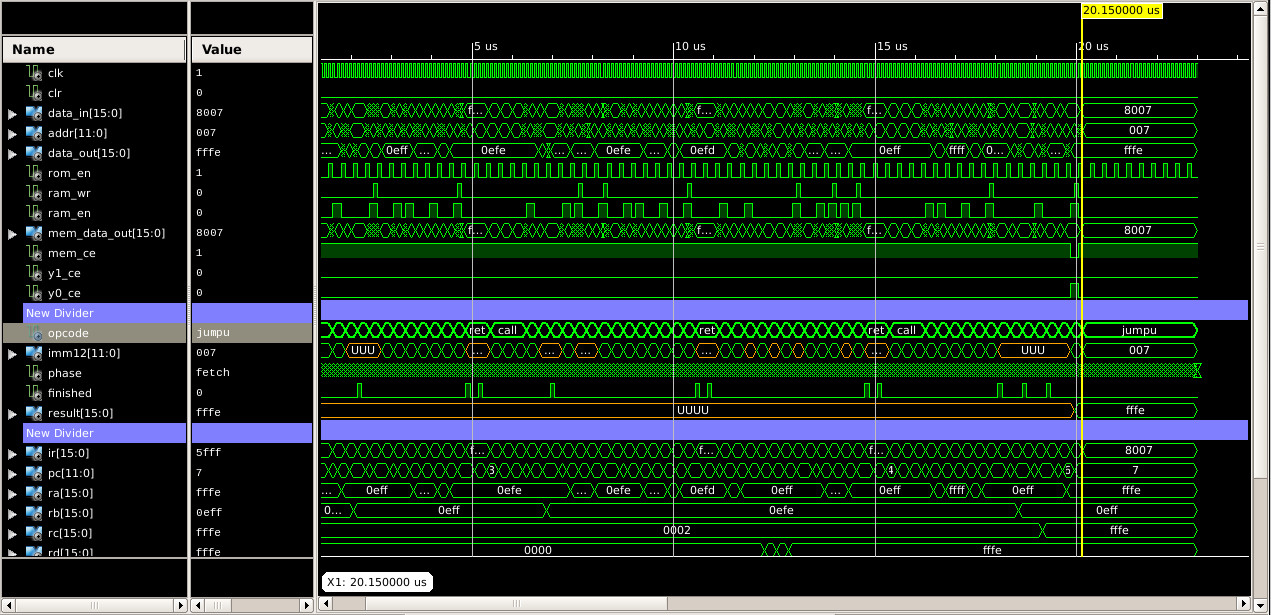
Figure 7 : variable (top) and stack (bottom) processing times
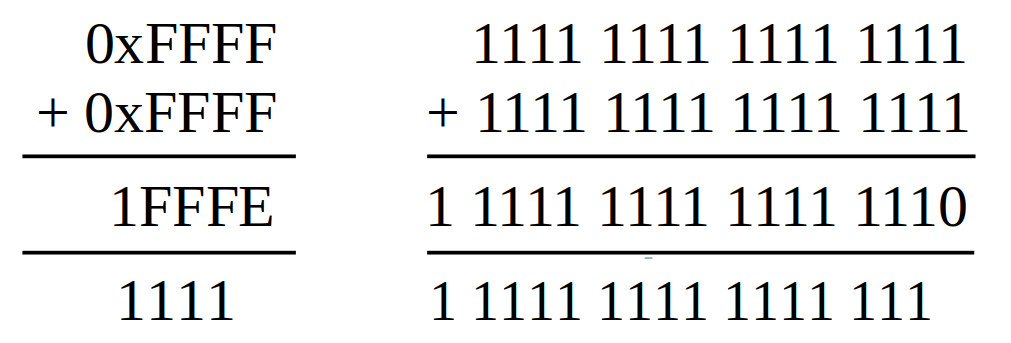
Figure 8 : 16-bit addition
Add two unsigned 16bit values to produce a 17bit result. Perhaps a little overkill to implement as a subroutine, but felt odd the leave it out. As the result could be larger than 16bits i.e. max is 0xFFFF + 0xFFFF = 0x1FFFE, we need to use two memory locations, to store that extra 1bit. In this implementation i used the SHL instruction to move the carry flag bit into the LSB of the high result word i.e. if no carry generate shifts in a 0, if a carry is generated shifts in a 1.
Test code for unsigned 16bit values stored in variables:
#################################
# TEST CODE : VARIABLES - 16bit #
#################################

start:
  jump test               # test code
fail:
  jump fail               # if simulation finished with address 1 = failed test
pass:
  jump pass               # if simulation finished with address 2 = passed test
trap:
  jump trap               # debug

data_ptr:
  .data data              # index into array
data_stop_pntr:
  .data data_end          # address of end of array

data:
  .data 0x0000            # test data 0+0=0
  .data 0x0000
  .data 0x0000            # result
  .data 0x0000
  .data 0x00FF            # test data 255+255=510
  .data 0x00FF
  .data 0x01FE            # result
  .data 0x0000
  .data 0x0FFF            # test data 4095+4095=8190
  .data 0x0FFF
  .data 0x1FFE            # result
  .data 0x0000
  .data 0xFFFF            # test data 65535+1=65536 = 0x10000
  .data 0x0001
  .data 0x0000            # result
  .data 0x0001
  .data 0xFFFF            # test data 65535+65535=131070 = 0x1FFFE
  .data 0xFFFF
  .data 0xFFFE            # result
  .data 0x0001
data_end:
  .data 0

test:
  load ra data_ptr        # read address of data
  load ra (ra)            # read data
  store ra W              # store in working variable
  store ra 0xFFF          # print INPUT 0 to screen

  load ra data_ptr        # read address of data
  add ra 1                # increment
  store ra data_ptr
  load ra (ra)            # read test result
  store ra X              # store in working variable
  store ra 0xFFF          # print INPUT 1 to screen

  call add16u             # process data

  load ra data_ptr        # read address of data
  add ra 1                # increment
  store ra data_ptr
  load ra (ra)            # read test result
  move rb ra

  load ra Y_LOW           # read code result
  store ra 0xFFF          # print OUTPUT LOW to screen
  sub rb ra               # equal?
  jumpnz fail             # no, stop fail

  load ra data_ptr        # read address of data
  add ra 1                # increment
  store ra data_ptr
  load ra (ra)            # read test result
  move rb ra

  load ra Y_HIGH          # read code result
  store ra 0xFFF          # print OUTPUT HIGH to screen
  sub rb ra               # equal?
  jumpnz fail             # no, stop fail

  load ra data_ptr        # yes, inc pntr
  add ra 1
  store ra data_ptr
  subm ra data_stop_pntr  # have all tests been performed?
  jumpz pass              # yes, pass

  jump test               # no, repeat

###################
# ADD SUBROUTINES #
###################

# description: 16bit unsigned addition
# result (17bit) = Y_HIGH (1bit) || Y_LOW (16bit) <= W (16bit) + X (16bit)
# input: W (operand), X (operand)
# output: (high result) Y_HIGH (16bit) || Y_LOW (16bit) (low result)

add16u:
  load ra W            # read W into RA
  addm ra X            # RA = W + X
  store ra Y_LOW       # save low word result
  move ra 0            # clear RA
  rol ra               # rotate left, move CY flag into LSB
  store ra Y_HIGH      # save high word result
  ret
A complexity comes when we consider signed values e.g. 0xFFFF is -1 as a signed representation, so -1 + -1 = -2 which is the value 0xFFFFFFFE. However, if you use the previous subroutine you will produce the value 0x0001FFFE. Therefore, we need different subroutines for signed and unsigned values i.e. carry operations are processed differently, or to put it another way if we wish to keep the extra bit generated by the signed addition, we need to sign extend the 16bit values into 32bit values first. RULE NUMBER 1 of signed arithmetic : the final carry is ALWAYS ignored. Soooo our 16bit signed addition turns into a 32bit addition
Test code for signed 16bit values stored in variables:
#################################
# TEST CODE : VARIABLES - 16bit #
#################################

start:
  jump test               # test code
fail:
  jump fail               # if simulation finished with address 1 = failed test
pass:
  jump pass               # if simulation finished with address 2 = passed test
trap:
  jump trap               # debug

data_ptr:
  .data data              # index into array
data_stop_pntr:
  .data data_end          # address of end of array

data:
  .data 0x0000            # test data 0+0=0
  .data 0x0000
  .data 0x0000            # result
  .data 0x0000
  .data 0x00FF            # test data 255+255=510
  .data 0x00FF
  .data 0x01FE            # result
  .data 0x0000
  .data 0x0FFF            # test data 4095+4095=8190
  .data 0x0FFF
  .data 0x1FFE            # result
  .data 0x0000
  .data 0xFFFF            # test data -1+1=0 = 0x0000
  .data 0x0001
  .data 0x0000            # result
  .data 0x0000
  .data 0xFFFF            # test data -1+-1=-2 = 0xFFFFFFFE
  .data 0xFFFF
  .data 0xFFFE            # result
  .data 0xFFFF
  .data 0x8000            # test data −32768+−32768=−65536 = 0x8000+0x8000=0xFFFF0000
  .data 0x8000
  .data 0x0000            # result
  .data 0xFFFF
data_end:
  .data 0

test:
  load ra data_ptr        # read address of data
  load ra (ra)            # read data
  store ra W              # store in working variable
  store ra 0xFFF          # print INPUT 0 LOW to screen

  load ra data_ptr        # read address of data
  add ra 1                # increment
  store ra data_ptr
  load ra (ra)            # read test result
  store ra X              # store in working variable
  store ra 0xFFF          # print INPUT 1 to screen

  call add16              # process data

  load ra data_ptr        # read address of data
  add ra 1                # increment
  store ra data_ptr
  load ra (ra)            # read test result
  move rb ra

  load ra Y_LOW           # read code result
  store ra 0xFFF          # print OUTPUT LOW to screen
  sub rb ra               # equal?
  jumpnz fail             # no, stop fail

  load ra data_ptr        # read address of data
  add ra 1                # increment
  store ra data_ptr
  load ra (ra)            # read test result
  move rb ra

  load ra Y_HIGH          # read code result
  store ra 0xFFF          # print OUTPUT HIGH to screen
  sub rb ra               # equal?
  jumpnz fail             # no, stop fail

  load ra data_ptr        # yes, inc pntr
  add ra 1
  store ra data_ptr
  subm ra data_stop_pntr  # have all tests been performed?
  jumpz pass              # yes, pass

  jump test               # no, repeat

###################
# ADD SUBROUTINES #
###################

# description: 16bit signed addition
# result (32bit) = Y_HIGH (166bit) || Y_LOW (16bit) <= ((W(15)16 || W (16bit)) +
#                                                      ((X(15)16 || X (16bit))
# input: W_HIGH || W_LOW (operand), X_HIGH || X_LOW (operand)
# output: (high result) Y_HIGH (16bit) || Y_LOW (16bit) (low result)

add16:
  move ra 0            # zero high words
  store ra W_HIGH
  store ra X_HIGH

  load ra W            # read W
  rol ra               # is MSB set?
  jumpnc add16_x

  move ra 0xFF         # sign extend with 1s
  store ra W_HIGH

add16_x:
  load ra X            # read X
  rol ra               # is MSB set?
  jumpnc add16_calc

  move ra 0xFF         # sign extend with 1s
  store ra X_HIGH

add16_calc:
  load ra W_LOW
  addm ra X_LOW        # RA = W_LOW + X_LOW
  store ra Y_LOW       # save low word result
  load ra W_HIGH
  addmc ra X_HIGH      # RA = W_HIGH + X_HIGH + C
  store ra Y_HIGH      # save high word result
  ret
Test code for unsigned 32bit values stored in variables:
#################################
# TEST CODE : VARIABLES - 32bit #
#################################

start:
  jump test               # test code
fail:
  jump fail               # if simulation finished with address 1 = failed test
pass:
  jump pass               # if simulation finished with address 2 = passed test
trap:
  jump trap               # debug

data_ptr:
  .data data              # index into array
data_stop_pntr:
  .data data_end          # address of end of array

data:
  .data 0x0000            # test data 0+0=0
  .data 0x0000
  .data 0x0000
  .data 0x0000
  .data 0x0000            # result
  .data 0x0000
  .data 0x0000
  .data 0xFFFF            # test data 65535+65535=131070 = 0x1FFFE
  .data 0x0000
  .data 0xFFFF
  .data 0x0000
  .data 0xFFFE            # result
  .data 0x0001
  .data 0x0000
  .data 0xFFFF            # test data 4,294,967,295+1 = 4,294,967,296
  .data 0xFFFF
  .data 0x0001
  .data 0x0000
  .data 0x0000            # result
  .data 0x0000
  .data 0x0001
data_end:
  .data 0                 # finished

test:
  load ra data_ptr        # read address of data
  load ra (ra)            # read data
  store ra W              # store in working variable
  store ra 0xFFF          # print INPUT 0 to screen

  load ra data_ptr        # read address of data
  add ra 1                # increment
  store ra data_ptr
  load ra (ra)            # read test result
  store ra X              # store in working variable
  store ra 0xFFF          # print INPUT 1 to screen

  call add16              # process data

  load ra data_ptr        # read address of data
  add ra 1                # increment
  store ra data_ptr
  load ra (ra)            # read test result
  move rb ra

  load ra Y_LOW           # read code result
  store ra 0xFFF          # print OUTPUT LOW to screen
  sub rb ra               # equal?
  jumpnz fail             # no, stop fail

  load ra data_ptr        # read address of data
  add ra 1                # increment
  store ra data_ptr
  load ra (ra)            # read test result
  move rb ra

  load ra Y_HIGH          # read code result
  store ra 0xFFF          # print OUTPUT HIGH to screen
  sub rb ra               # equal?
  jumpnz fail             # no, stop fail

  load ra data_ptr        # yes, inc pntr
  add ra 1
  store ra data_ptr
  subm ra data_stop_pntr  # have all tests been performed?
  jumpz pass              # yes, pass

  jump test               # no, repeat

###################
# ADD SUBROUTINES #
###################

# description: 32bit addition
# result (33bit) = Z_LOW (1bit) || Y_HIGH (16bit) || Y_LOW (16bit) <= (W_HIGH (16bit) || W_HIGH (16bit)) +
#                                                                     (X_HIGH (16bit) || X_HIGH (16bit))
# input: W_HIGH || W_LOW (operand), X_HIGH || X_LOW (operand)
# output: (high result) Z_LOW (1bit) || Y_HIGH (16bit) || Y_LOW (16bit) (low result)

add32u:
  load ra W_LOW       # read W_LOW into RA
  addm ra X_LOW       # RA = W_LOW + X_LOW
  store ra Y_LOW      # save low word result
  load ra W_HIGH      # read W_HIGH into RA
  addmc ra X_HIGH     # RA = W_HIGH + X_HIGH
  store ra Y_HIGH     # save low word result
  move ra 0           # clear RA
  rol ra              # rotate left, move CY flag into LSB
  store ra Z_LOW      # save high word result
  ret
The equivalent 32bit signed addition subroutine would again need the W and X variables to be signed extended i.e. from 32bit to 48bit or 64bit values. For the intended games console application i am not sure such a subroutine is needed, sooo for the moment i am not going to implement this subroutine.
Stack based solution, 16bit unsigned arguments and results are transferred between the caller and callee via the stack:
#############################
# TEST CODE : STACK - 16bit #
#############################

start:
  jump test               # test code
fail:
  jump fail               # if simulation finished with address 1 = failed test
pass:
  jump pass               # if simulation finished with address 2 = passed test
trap:
  jump trap               # debug

data_ptr:
  .data data              # index into array
data_stop_pntr:
  .data data_end          # address of end of array

data:
  .data 0x0000            # test data 0+0=0
  .data 0x0000
  .data 0x0000            # result
  .data 0x0000
  .data 0x00FF            # test data 255+255=510
  .data 0x00FF
  .data 0x01FE            # result
  .data 0x0000
  .data 0x0FFF            # test data 4095+4095=8190
  .data 0x0FFF
  .data 0x1FFE            # result
  .data 0x0000
  .data 0xFFFF            # test data 65535+1=65536 = 0x10000
  .data 0x0001
  .data 0x0000            # result
  .data 0x0001
  .data 0xFFFF            # test data 65535+65535=131070 = 0x1FFFE
  .data 0xFFFF
  .data 0xFFFE            # result
  .data 0x0001
data_end:
  .data 0

#  ------------
#  |    RC    |    FP+2   INPUT 0
#  ------------
#  |    RC    |    FP+1   INPUT 1
#  ------------
#  |    FP    |
#  ------------

test:
  load ra data_ptr          # read address of data
  load ra (ra)              # read data
  store ra 0xFFF            # print INPUT 0 to screen
  move rc ra
  call push16               # push data to stack

  load ra data_ptr          # read address of data
  add ra 1                  # increment
  store ra data_ptr
  load ra (ra)              # read test result
  store ra 0xFFF            # print INPUT 1 to screen
  move rc ra
  call push16               # push data to stack

  call add16u_stack         # process data

  call pop16                # pop result off stack
  move ra rc                # display OUTPUT LOW result in simulation
  store ra 0xFFF

  load ra data_ptr          # read address of data
  add ra 1                  # increment
  store ra data_ptr
  load ra (ra)              # read test result
  sub rc ra                 # equal?
  jumpnz fail               # no, stop fail

  call pop16                # pop result off stack
  move ra rc                # display OUTPUT HIGH result in simulation
  store ra 0xFFF

  load ra data_ptr          # read address of data
  add ra 1                  # increment
  store ra data_ptr
  load ra (ra)              # read test result
  sub rc ra                 # equal?
  jumpnz fail               # no, stop fail

  load ra data_ptr          # yes, inc pntr
  add ra 1
  store ra data_ptr
  subm ra data_stop_pntr    # have all tests been performed?
  jumpz pass                # yes, pass

  jump test                 # no, repeat

###################
# ADD SUBROUTINES #
###################

# description: 16bit unsigned addition
# result (17bit) = FP+2 (1bit) + FP+1 (16bit) <= FP+1 (16bit) + FP+2 (16bit)
# input: FP+1 (operand), FP+2 (operand)
# output: (high result) FP+2 || FP+1 (low result)
# caller clean-up : 0

add16u_stack:
  call stack_subroutine_enter

  load ra FRAME_POINTER        # read arguments into RC and RD
  add ra 1
  load rc (ra)                 # data
  add ra 1
  load rd (ra)                 # data

  add rd rc                    # add data
  move rc rd
  move rd 0                    # carry bit
  rol rd

  load ra FRAME_POINTER
  add ra 2
  store rd (ra)                # save high word result
  sub ra 1
  store rc (ra)                # save low word result

  call stack_subroutine_exit
  ret
Stack based solution, 32bit unsigned arguments and results are transferred between the caller and callee via the stack:
#############################
# TEST CODE : STACK - 32bit #
#############################

start:
  jump test                   # test code
fail:
  jump fail                   # if simulation finished with address 1 = failed test
pass:
  jump pass                   # if simulation finished with address 2 = passed test
trap:
  jump trap                   # debug

data_ptr:
  .data data                  # index into array
data_stop_pntr:
  .data data_end              # address of end of array

data:
  .data 0x0000                # test data 0+0=0
  .data 0x0000
  .data 0x0000
  .data 0x0000
  .data 0x0000                # result
  .data 0x0000
  .data 0x0000
  .data 0xFFFF                # test data 65535+65535=131070 = 0x1FFFE
  .data 0x0000
  .data 0xFFFF
  .data 0x0000
  .data 0xFFFE                # result
  .data 0x0001
  .data 0x0000
  .data 0xFFFF                # test data 4,294,967,295+1 = 4,294,967,296
  .data 0xFFFF
  .data 0x0001
  .data 0x0000
  .data 0x0000                # result
  .data 0x0000
  .data 0x0001
data_end:
  .data 0                     # finished

#  ------------
#  |    RD    |    FP+4   INPUT 0 HIGH
#  ------------
#  |    RC    |    FP+3   INPUT 0 LOW
#  ------------
#  |    RD    |    FP+2   INPUT 1 HIGH
#  ------------
#  |    RC    |    FP+1   INPUT 1 LOW
#  ------------
#  |    FP    |
#  ------------

test:
  load ra data_ptr            # read address of data
  load ra (ra)                # read data
  store ra 0xFFF              # print INPUT 0 LOW to screen
  move rc ra

  load ra data_ptr            # read address of data
  add ra 1                    # increment
  store ra data_ptr
  load ra (ra)                # read test result
  store ra 0xFFF              # print INPUT 0 HIGH to screen
  move rd ra

  call push32                 # push data onto stack

  load ra data_ptr            # read address of data
  add ra 1                    # increment
  store ra data_ptr
  load ra (ra)                # read data
  store ra 0xFFF              # print INPUT 1 LOW to screen
  move rc ra

  load ra data_ptr            # read address of data
  add ra 1                    # increment
  store ra data_ptr
  load ra (ra)                # read test result
  store ra 0xFFF              # print INPUT 1 HIGH to screen
  move rd ra

  call push32                 # push data onto stack

  call add32u_stack           # process data

  call pop32                  # pop result off stack
  move ra rc
  store ra 0xFFF              # print OUTPUT LOW to screen
  move ra rd
  store ra 0xFFF              # print OUTPUT MID to screen

  load ra data_ptr            # read address of data
  add ra 1                    # increment
  store ra data_ptr
  load ra (ra)                # read test result
  sub rc ra                   # equal?
  jumpnz fail                 # no, stop fail

  load ra data_ptr            # read address of data
  add ra 1                    # increment
  store ra data_ptr
  load ra (ra)                # read test result
  sub rd ra                   # equal?
  jumpnz fail                 # no, stop fail

  call pop16                  # pop result off stack
  move ra rc                  # print OUTPUT HIGH to screen
  store ra 0xFFF

  load ra data_ptr            # read address of data
  add ra 1                    # increment
  store ra data_ptr
  load ra (ra)                # read test result
  sub rc ra                   # equal?
  jumpnz fail                 # no, stop fail

  load ra data_ptr            # yes, inc pntr
  add ra 1
  store ra data_ptr
  subm ra data_stop_pntr      # have all tests been performed?
  jumpz pass                  # yes, pass

  move rc 1                   # remove old argument
  call stack_remove_arguments
  jump test                   # no, repeat

###################
# ADD SUBROUTINES #
###################

# description: 32bit unsigned addition
# result (33bit) = FP+3 (1bit) || FP+2 (16bit) || FP+1 (16bit) <= (FP+2 (16bit) || FP+1 (16bit)) +
#                                                                 (FP+4 (16bit) || FP+3 (16bit))
# input: FP+2 || FP+1 (operand), FP+4 || FP+3 (operand)
# output: (high result) FP+3 (1bit) || FP+2 (16bit) || FP+1 (16bit) (low result)
# caller clean-up : 1

add32u_stack:
  call stack_subroutine_enter

  load ra FRAME_POINTER        # read low data
  add ra 3
  load rc (ra)
  sub ra 2
  load rd (ra)

  add rc rd                    # add data
  store rc (ra)
  move rb 0                    # carry bit
  rol rb

  add ra 3
  load rc (ra)
  sub ra 2
  load rd (ra)

  add rc rd                    # add data
  add rc rb
  store rc (ra)
  move rb 0                    # carry bit
  rol rb

  add ra 1
  store rb (ra)

  call stack_subroutine_exit
  ret
I have not implemented a stack based 16bit signed addition subroutine. The thoughts here were that if you do need this subroutine it can be implemented using the 32bit unsigned add stack based subroutine i.e. argument sign extension is performed by the caller code.

Figure 9 : fixed point addition
The previous add16 and add32 subroutines can also be used to perform fixed-point calculations. A fixed-point number is a binary number with an imaginary decimal point i.e. a user defined decimal point, as shown in figure 9. Remember, the decimal point is not represented in hardware. In this example we have a Q16.16 representations of the values 123.456 and 89.012. These values are not exact powers of 2, therefore, there will be a rounding error when these are converted into a binary representation. These binary values are then just added together using the signed or unsigned Add subroutines. Note, when processing integer and fixed-point values you must to make sure you align the decimal points, consider the signed Q4.4 fixed point and 4bit integer values below:
15.9375 = 01111.1111
10.5    = 01010.1000
-10.5   = 10101.1000
-16     = 10000.0000

16      = 10000.
10      = 1010.
5       = 101.

10.5 + -10.5 = 01010.1000
               10101.1000
               ----------
               00000.0000  == 0
               ----------
              111111

10.5 + 5 =     01010.1000
               00101.0000   -- Aligned decimal points
               ----------
               01111.1000  == 15.5
               ----------

10.5 + -16 =   01010.1000
               10000.0000
               ----------
               11010.1000  == 00101.0111 + 1 = 101.1 = -5.5
               ----------
Note, as for integer representations if you represent a signed value you loose the MSB i.e. it becomes the sign bit, therefore, half the range. To convert a signed fixed point value into a negative value, ignore the decimal point, invert and add 1 as normal.
A variation on a theme here, rather than adding two 16bit numbers together we add one 16bit number to an accumulator, a running total, so these subroutines are only passed one argument. Decided not to implement a stack based version for this function as it wouldn't make sense i.e. where would the accumulator be stored? A stack is a dynamic thing used to store arguments and results. The caller code could push onto the stack space for this value, but this felt a little odd, so decided to just implement the variable based solution.
Test code for 16bit values stored in variables:
#################################
# TEST CODE : VARIABLES - 16bit #
#################################

start:
  jump test               # test code
fail:
  jump fail               # if simulation finished with address 1 = failed test
pass:
  jump pass               # if simulation finished with address 2 = passed test
trap:
  jump trap               # debug

data_ptr:
  .data data              # index into array
data_stop_pntr:
  .data data_end          # address of end of array

data:
  .data 0x000F            # test data 0+F       = F
  .data 0x00FF            #           F+FF      = 10E
  .data 0x0FFF            #           10E+FFF   = 110D
  .data 0xFFFF            #           110D+FFFF = 1110C
  .data 0x110C            # result
  .data 0x0001
data_end:
  .data 0                 # finished

test:
  load ra data_ptr        # read address of data
  load ra (ra)            # read data
  store ra W              # store in working variable
  store ra 0xFFF          # print INPUT 0 to screen

  call acc16              # process data (F)

  load ra data_ptr        # read address of data
  add ra 1                # increment
  store ra data_ptr
  load ra (ra)            # read test result
  store ra W              # store in working variable
  store ra 0xFFF          # print INPUT 1 to screen

  call acc16              # process data (FF)

  load ra data_ptr        # read address of data
  add ra 1                # increment
  store ra data_ptr
  load ra (ra)            # read test result
  store ra W              # store in working variable
  store ra 0xFFF          # print INPUT 2 to screen

  call acc16              # process data (FFF)

  load ra data_ptr        # read address of data
  add ra 1                # increment
  store ra data_ptr
  load ra (ra)            # read test result
  store ra W              # store in working variable
  store ra 0xFFF          # print INPUT 3 to screen

  call acc16              # process data (FFFF)

  load ra data_ptr        # read address of data
  add ra 1                # increment
  store ra data_ptr
  load ra (ra)            # read test result
  move rb ra

  load ra Y_LOW           # read code result
  store ra 0xFFF          # print OUTPUT to screen
  sub rb ra               # equal?
  jumpnz fail             # no, stop fail

  load ra data_ptr        # read address of data
  add ra 1                # increment
  store ra data_ptr
  load ra (ra)            # read test result
  move rb ra

  load ra Y_HIGH          # read code result
  store ra 0xFFF          # print OUTPUT to screen
  sub rb ra               # equal?
  jumpnz fail             # no, stop fail

  load ra data_ptr        # yes, inc pntr
  add ra 1
  store ra data_ptr
  subm ra data_stop_pntr  # have all tests been performed?
  jumpz pass              # yes, pass

  jump test               # no, repeat

###################
# ACC SUBROUTINES #
###################

# description: accumulate 16bit
# result (32bit) =  Y_HIGH (2bit) || Y_LOW (16bit) <= (Y_HIGH (16bit) || Y_LOW (16bit)) +
                                                      ((0)16 (16bit)  || W (16bit))
# input: W (16bit) (operand)
# output: (high result) Y_HIGH (16bit) || Y_LOW (16bit) (low result)

acc16:
  load ra Y_LOW      # read Y_LOW
  addm ra W          #
  store ra Y_LOW     # save low word result
  move ra 0          # clear RA
  addmc ra Y_HIGH    # add Y_HIGH, add in carry
  store ra Y_HIGH    # save high word result
  ret
Test code for 32bit values stored in variables:
#################################
# TEST CODE : VARIABLES - 16bit #
#################################

start:
  jump test               # test code
fail:
  jump fail               # if simulation finished with address 1 = failed test
pass:
  jump pass               # if simulation finished with address 2 = passed test
trap:
  jump trap               # debug

data_ptr:
  .data data              # index into array
data_stop_pntr:
  .data data_end          # address of end of array

data:
  .data 0xFFFF            # test data 0+FFFFF           = FFFFF
  .data 0x000F
  .data 0xFFFF            #           FFFFF+FFFFFF      = 10FFFFE
  .data 0x00FF
  .data 0xFFFF            #           10FFFFE+FFFFFFF   = 110FFFFD
  .data 0x0FFF
  .data 0xFFFF            #           110FFFFD+FFFFFFFF = 1110FFFFC
  .data 0xFFFF
  .data 0xFFFC            # result
  .data 0x110F
  .data 0x0001
  .data 0x0000
data_end:
  .data 0                 # finished

test:
  load ra data_ptr        # read address of data
  load ra (ra)            # read data
  store ra W_LOW          # store in working variable
  store ra 0xFFF          # print INPUT 0 LOW to screen

  load ra data_ptr        # read address of data
  add ra 1                # increment
  store ra data_ptr
  load ra (ra)            # read test result
  store ra W_HIGH         # store in working variable
  store ra 0xFFF          # print INPUT 0 HIGH to screen

  call acc32              # process data (FFFFF)

  load ra data_ptr        # read address of data
  add ra 1                # increment
  store ra data_ptr
  load ra (ra)            # read test result
  store ra W_LOW          # store in working variable
  store ra 0xFFF          # print INPUT 1 LOW to screen

  load ra data_ptr        # read address of data
  add ra 1                # increment
  store ra data_ptr
  load ra (ra)            # read test result
  store ra W_HIGH         # store in working variable
  store ra 0xFFF          # print INPUT 1 HIGH to screen

  call acc32              # process data (FFFFFF)

  load ra data_ptr        # read address of data
  add ra 1                # increment
  store ra data_ptr
  load ra (ra)            # read test result
  store ra W_LOW          # store in working variable
  store ra 0xFFF          # print INPUT 2 LOW to screen

  load ra data_ptr        # read address of data
  add ra 1                # increment
  store ra data_ptr
  load ra (ra)            # read test result
  store ra W_HIGH         # store in working variable
  store ra 0xFFF          # print INPUT 2 HIGH to screen

  call acc32              # process data (FFFFFFF)

  load ra data_ptr        # read address of data
  add ra 1                # increment
  store ra data_ptr
  load ra (ra)            # read test result
  store ra W_LOW          # store in working variable
  store ra 0xFFF          # print INPUT 3 LOW to screen

  load ra data_ptr        # read address of data
  add ra 1                # increment
  store ra data_ptr
  load ra (ra)            # read test result
  store ra W_HIGH         # store in working variable
  store ra 0xFFF          # print INPUT 3 HIGH to screen

  call acc32              # process data (FFFFFFFF)

  load ra data_ptr        # read address of data
  add ra 1                # increment
  store ra data_ptr
  load ra (ra)            # read test result
  move rb ra

  load ra Y_LOW           # read code result
  store ra 0xFFF          # print OUTPUT LOW to screen
  sub rb ra               # equal?
  jumpnz fail             # no, stop fail

  load ra data_ptr        # read address of data
  add ra 1                # increment
  store ra data_ptr
  load ra (ra)            # read test result
  move rb ra

  load ra Y_HIGH          # read code result
  store ra 0xFFF          # print OUTPUT MID LOW to screen
  sub rb ra               # equal?
  jumpnz fail             # no, stop fail

  load ra data_ptr        # read address of data
  add ra 1                # increment
  store ra data_ptr
  load ra (ra)            # read test result
  move rb ra

  load ra Z_LOW           # read code result
  store ra 0xFFF          # print OUTPUT MID HIGH to screen
  sub rb ra               # equal?
  jumpnz fail             # no, stop fail

  load ra data_ptr        # read address of data
  add ra 1                # increment
  store ra data_ptr
  load ra (ra)            # read test result
  move rb ra

  load ra Z_HIGH          # read code result
  store ra 0xFFF          # print OUTPUT HIGH to screen
  sub rb ra               # equal?
  jumpnz fail             # no, stop fail

  load ra data_ptr        # yes, inc pntr
  add ra 1
  store ra data_ptr
  subm ra data_stop_pntr  # have all tests been performed?
  jumpz pass              # yes, pass

  jump test               # no, repeat

###################
# ACC SUBROUTINES #
###################

# description: accumulate 32bit
# result (64bit) =  Z_HIGH (16bit) || Z_LOW (16bit) || Y_HIGH (16bit) || Y_LOW (16bit) <= (Z_HIGH (16bit) || Z_LOW (16bit) || Y_HIGH (16bit) || Y_LOW (16bit)) +
#                                                                                         ((0)16 (16bit)  || (0)16 (16bit) || W_HIGH (16bit) || W_LOW (16bit)) +
# input: W_HIGH, W_LOW (operand)
# output: (high result) Z_HIGH (16bit) || Z_LOW (16bit) || Y_HIGH (16bit) || Y_LOW (16bit) (low result)

acc32:
  load ra Y_LOW      # read Y_LOW
  addm ra W_LOW      #
  store ra Y_LOW     # save result
  load ra Y_HIGH     # read Y_HIGH
  addmc ra W_HIGH    #
  store ra Y_HIGH    # save result
  move ra 0          #
  addmc ra Z_LOW     #
  store ra Z_LOW     # save result
  move ra 0          #
  addmc ra Z_HIGH    #
  store ra Z_HIGH    # save result
  ret
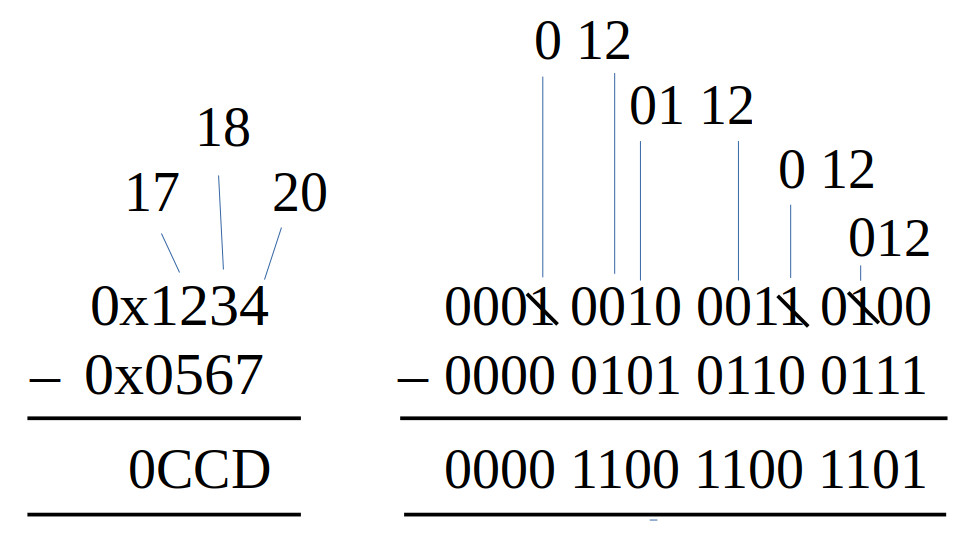
Figure 10 : 16-bit subtraction - positive result
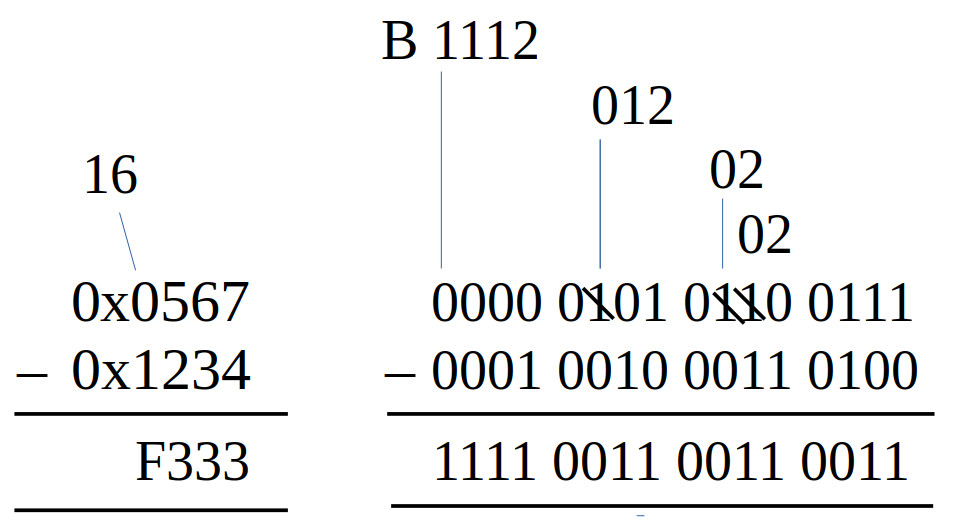
Figure 11 : 16-bit subtraction - negative result
Subtract two unsigned 16bit values to produce a 16bit result. Again perhaps a little overkill to implement as a subroutine, but included for completeness. The joy of subtracting unsigned values is that the result will always be smaller than the original values, so no carries to worry about, not complexities of capturing that extra bit. However, you can generate a signed result as shown in figure 10, sooo you do need to consider this when allocating variables, recognise you will be working with a 15bit number range i.e. signed 16bit values. This is also an important point to remember if this result is passed to other functions e.g. multiply or divide, as these are unsigned only implementations.
Note, showing how the borrows work in figures 10 and 11 was a little tricky, particularly when looking at hexadecimal i.e. borrowing 16 rather than 2. Sooo the number above the hex digits are that columns value after the borrow, hopefully that makes sense :). The hex, dec and bin representations and the result of these calculations are shown below:
0x567  = 0000 0101 0110 0111 = 1383
0x1234 = 0001 0010 0011 0100 = 4660

0x1234 – 0x567 = 4660 – 1383 = 3277 = 0xCCD
0x567 – 0x1234 = 1383 – 4660 = −3277 = 0xF130

3277 = 0xCCD = 0000 1100 1100 1101
               1111 0011 0011 0010
-3277 =        1111 0011 0011 0011 = 0xF333
Hopefully the above makes sense, gives a better understand of the results from the two examples, the calculations and the conversion of the result -3277 into a signed binary value. As always to convert a negative value into its positive value just invert and add 1 :).
Test code for unsigned 16bit values stored in variables:
#################################
# TEST CODE : VARIABLES - 16bit #
#################################

start:
  jump test               # test code
fail:
  jump fail               # if simulation finished with address 1 = failed test
pass:
  jump pass               # if simulation finished with address 2 = passed test
trap:
  jump trap               # debug

data_ptr:
  .data data              # index into array
data_stop_pntr:
  .data data_end          # address of end of array

data:
  .data 0x0000            # test data 0-0=0
  .data 0x0000
  .data 0x0000            # result
  .data 0x00FF            # test data 255-255=0
  .data 0x00FF
  .data 0x0000            # result
  .data 0x00FF            # test data 255-0=255
  .data 0x0000
  .data 0x00FF            # result
  .data 0x0000            # test data 0-255=-255  = 0x00FF = 0xFF00+1
  .data 0x00FF
  .data 0xFF01            # result
  .data 0xFFFF            # test data -1--1=0
  .data 0xFFFF
  .data 0x0000            # result
data_end:
  .data 0

test:
  load ra data_ptr        # read address of data
  load ra (ra)            # read data
  store ra W              # store in working variable
  store ra 0xFFF          # print INPUT 0 to screen

  load ra data_ptr        # read address of data
  add ra 1                # increment
  store ra data_ptr
  load ra (ra)            # read test result
  store ra X              # store in working variable
  store ra 0xFFF          # print INPUT 1 to screen

  call sub16u             # process data

  load ra data_ptr        # read address of data
  add ra 1                # increment
  store ra data_ptr
  load ra (ra)            # read test result
  move rb ra

  load ra Y               # read code result
  store ra 0xFFF          # print OUTPUT to screen
  sub rb ra               # equal?
  jumpnz fail             # no, stop fail

  load ra data_ptr        # yes, inc pntr
  add ra 1
  store ra data_ptr
  subm ra data_stop_pntr  # have all tests been performed?
  jumpz pass              # yes, pass

  jump test               # no, repeat

###################
# SUB SUBROUTINES #
###################

# description: 16bit unsigned subtraction
# result (16bit) = Y (16bit) <= W (16bit) - X (16bit)
# input: W (operand), X (operand)
# output: Y (result)

sub16u:
  load ra W
  subm ra X
  store ra Y
  ret
Test code for unsigned 32bit values stored in variables:
#################################
# TEST CODE : VARIABLES - 32bit #
#################################

start:
  jump test               # test code
fail:
  jump fail               # if simulation finished with address 1 = failed test
pass:
  jump pass               # if simulation finished with address 2 = passed test
trap:
  jump trap               # debug

data_ptr:
  .data data              # index into array
data_stop_pntr:
  .data data_end          # address of end of array

data:
  .data 0x0000            # test data 0-0=0
  .data 0x0000
  .data 0x0000
  .data 0x0000
  .data 0x0000            # result
  .data 0x0000
  .data 0xFFFF            # test data FFFFF-FFFFF=0
  .data 0x000F
  .data 0xFFFF
  .data 0x000F
  .data 0x0000            # result
  .data 0x0000
  .data 0xFFFF            # test data FFFFF-0=FFFFF
  .data 0x000F
  .data 0x0000
  .data 0x0000
  .data 0xFFFF            # result
  .data 0x000F
  .data 0x0000            # test data 0-FFFFF=-FFFFF  = 0x000FFFFF = 0xFFF00000+1
  .data 0x0000
  .data 0xFFFF
  .data 0x000F
  .data 0x0001            # result
  .data 0xFFF0
  .data 0xFFFF            # test data -1--1=0
  .data 0xFFFF
  .data 0xFFFF
  .data 0xFFFF
  .data 0x0000            # result
  .data 0x0000
data_end:
  .data 0

test:
  load ra data_ptr        # read address of data
  load ra (ra)            # read data
  store ra W              # store in working variable
  store ra 0xFFF          # print INPUT 0 LOW to screen

  load ra data_ptr        # read address of data
  add ra 1                # increment
  store ra data_ptr
  load ra (ra)            # read test result
  store ra X              # store in working variable
  store ra 0xFFF          # print INPUT 1 to screen

  call sub32u             # process data

  load ra data_ptr        # read address of data
  add ra 1                # increment
  store ra data_ptr
  load ra (ra)            # read test result
  move rb ra

  load ra Y               # read code result
  store ra 0xFFF          # print OUTPUT LOW to screen
  sub rb ra               # equal?
  jumpnz fail             # no, stop fail

  load ra data_ptr        # yes, inc pntr
  add ra 1
  store ra data_ptr
  subm ra data_stop_pntr  # have all tests been performed?
  jumpz pass              # yes, pass

  jump test               # no, repeat

###################
# SUB SUBROUTINES #
###################

# description: 32bit unsigned subtraction
# result (16bit) = Y_HIGH (16bit) || Y_LOW (16bit) <= (W_HIGH (16bit) || W_LOW (16bit)) - (X_HIGH (16bit) || X_LOW (16bit))
# input: W (operand), X (operand)
# output: Y (result)

sub32u:
  load ra W_LOW
  subm ra X_LOW
  store ra Y_LOW
  load ra W_HIGH
  submc ra X_HIGH
  store ra Y_HIGH
  ret
Stack based solution, unsigned 16bit arguments and results are transferred between the caller and callee via the stack:
#############################
# TEST CODE : STACK - 16bit #
#############################

start:
  jump test                    # test code
fail:
  jump fail                    # if simulation finished with address 1 = failed test
pass:
  jump pass                    # if simulation finished with address 2 = passed test
trap:
  jump trap                    # debug

data_ptr:
  .data data                   # index into array
data_stop_pntr:
  .data data_end               # address of end of array

data:
  .data 0x0000                 # test data 0-0=0
  .data 0x0000
  .data 0x0000                 # result
  .data 0x00FF                 # test data 255-255=0
  .data 0x00FF
  .data 0x0000                 # result
  .data 0x00FF                 # test data 255-0=255
  .data 0x0000
  .data 0x00FF                 # result
  .data 0x0000                 # test data 0-255=-255  = 0x00FF = 0xFF00+1
  .data 0x00FF
  .data 0xFF01                 # result
  .data 0xFFFF                 # test data -1--1=0
  .data 0xFFFF
  .data 0x0000                 # result
data_end:
  .data 0

#  ------------
#  |    RC    |    FP+2   INPUT 0
#  ------------
#  |    RC    |    FP+1   INPUT 1
#  ------------
#  |    FP    |
#  ------------

test:
  load ra data_ptr             # read address of data
  load ra (ra)                 # read data
  store ra 0xFFF               # print INPUT 0 to screen

  move rc ra
  call push16                  # push to stack

  load ra data_ptr             # read address of data
  add ra 1                     # increment
  store ra data_ptr
  load ra (ra)                 # read test result
  store ra 0xFFF               # print INPUT 1 to screen

  move rc ra
  call push16                  # push to stack

  call sub16u_stack            # process data

  call pop16                   # pop result off stack
  move ra rc                   # display OUTPUT to screen
  store ra 0xFFF

  load ra data_ptr             # read address of data
  add ra 1                     # increment
  store ra data_ptr
  load ra (ra)                 # read test result
  sub rc ra                    # equal?
  jumpnz fail                  # no, stop fail

  load ra data_ptr             # yes, inc pntr
  add ra 1
  store ra data_ptr
  subm ra data_stop_pntr       # have all tests been performed?
  jumpz pass                   # yes, pass

  move rc 1
  call stack_remove_arguments  # remove argument from stack
  jump test                    # repeat

###################
# SUB SUBROUTINES #
###################

# description: 16bit unsigned subtraction
# result (16bit) = FP+1 (16bit) <= FP+2 (16bit) - FP+1 (16bit)
# input: FP+1 (operand), FP+2 (operand)
# output: FP+1 (result)
# caller clean-up : 1

sub16u_stack:
  call stack_subroutine_enter

  load ra FRAME_POINTER        # read arguments into RC and RD
  add ra 1
  load rc (ra)                 # data
  add ra 1
  load rd (ra)                 # data

  sub rd rc                    # add data

  load ra FRAME_POINTER
  add ra 1
  store rd (ra)                # save word result

  call stack_subroutine_exit
  ret
Stack based solution, unsigned 32bit arguments and results are transferred between the caller and callee via the stack:
#############################
# TEST CODE : STACK - 32bit #
#############################

start:
  jump test                   # test code
fail:
  jump fail                   # if simulation finished with address 1 = failed test
pass:
  jump pass                   # if simulation finished with address 2 = passed test
trap:
  jump trap                   # debug

data_ptr:
  .data data                  # index into array
data_stop_pntr:
  .data data_end              # address of end of array

data:
  .data 0x0000            # test data 0-0=0
  .data 0x0000
  .data 0x0000
  .data 0x0000
  .data 0x0000            # result
  .data 0x0000
  .data 0xFFFF            # test data FFFFF-FFFFE=1
  .data 0x000F
  .data 0xFFFE
  .data 0x000F
  .data 0x0001            # result
  .data 0x0000
  .data 0xFFFF            # test data FFFFF-0=FFFFF
  .data 0x000F
  .data 0x0000
  .data 0x0000
  .data 0xFFFF            # result
  .data 0x000F
  .data 0x0000            # test data 0-FFFFF=-FFFFF  = 0x000FFFFF = 0xFFF00000+1
  .data 0x0000
  .data 0xFFFF
  .data 0x000F
  .data 0x0001            # result
  .data 0xFFF0
  .data 0xFFFF            # test data -1--1=0
  .data 0xFFFF
  .data 0xFFFF
  .data 0xFFFF
  .data 0x0000            # result
  .data 0x0000
data_end:
  .data 0

#  ------------
#  |    RD    |    FP+2   INPUT 0 HIGH
#  ------------
#  |    RC    |    FP+1   INPUT 0 LOW
#  ------------
#  |    RD    |    FP+2   INPUT 1 HIGH
#  ------------
#  |    RC    |    FP+1   INPUT 1 LOW
#  ------------
#  |    FP    |
#  ------------

test:
  load ra data_ptr            # read address of data
  load ra (ra)                # read data
  store ra 0xFFF              # print INPUT 0 LOW to screen
  move rc ra

  load ra data_ptr            # read address of data
  add ra 1                    # increment
  store ra data_ptr
  load ra (ra)                # read test result
  store ra 0xFFF              # print INPUT 0 HIGH to screen
  move rd ra

  call push32                 # push data onto stack

  load ra data_ptr            # read address of data
  add ra 1                    # increment
  store ra data_ptr
  load ra (ra)                # read test result
  store ra 0xFFF              # print INPUT 1 LOW to screen
  move rc ra

  load ra data_ptr            # read address of data
  add ra 1                    # increment
  store ra data_ptr
  load ra (ra)                # read test result
  store ra 0xFFF              # print INPUT 1 HIGH to screen
  move rd ra

  call push32                 # push data onto stack

  call sub32u_stack           # process data

  call pop32                  # pop result off stack

  move ra rc
  store ra 0xFFF              # print OUTPUT LOW to screen
  move ra rd
  store ra 0xFFF              # print OUTPUT HIGH to screen

  load ra data_ptr            # read address of data
  add ra 1                    # increment
  store ra data_ptr
  load ra (ra)                # read test result
  sub rc ra                   # equal?
  jumpnz fail                 # no, stop fail

  load ra data_ptr            # read address of data
  add ra 1                    # increment
  store ra data_ptr
  load ra (ra)                # read test result
  sub rd ra                   # equal?
  jumpnz fail                 # no, stop fail

  load ra data_ptr            # yes, inc pntr
  add ra 1
  store ra data_ptr
  subm ra data_stop_pntr      # have all tests been performed?
  jumpz pass                  # yes, pass

  move rc 2
  call stack_remove_arguments  # remove argument from stack
  jump test                    # no, repeat

###################
# SUB SUBROUTINES #
###################

# description: 32bit unsigned subtraction
# result (32bit) = FP+2 (16bit) || FP+1 (16bit) <= (FP+4 (16bit) || FP+3 (16bit)) -
#                                                  (FP+2 (16bit) || FP+1 (16bit))
# input: FP+2 || FP+1 (operand), FP+4 || FP+3 (operand)
# output: (high result) FP+2 (16bit) || FP+1 (16bit) (low result)
# caller clean-up : 2

sub32u_stack:
  call stack_subroutine_enter

  load ra FRAME_POINTER        # read low data

  add ra 3
  load rc (ra)
  sub ra 2
  load rd (ra)

  sub rc rd                    # sub data
  store rc (ra)
  move rb 0                    # buffer carry bit
  rol rb

  add ra 3                     # read high data
  load rc (ra)
  sub ra 2
  load rd (ra)

  ror rb                       # restore carry bit
  subc rc rd                   # sub data
  store rc (ra)

  call stack_subroutine_exit
  ret
Again its a little more complex when we come to signed arithmetic and the sign bit e.g. 0x8000 is the minimum 2s complement value, so 0x8000 - 0x0001 will generate a negative overflow, as we need more bits to represent this value, as shown in the conversions below.
0x8000  - 0x0001 = 0x7FFF  WRONG
0xF8000 - 0x0001 = 0xF7FFF CORRECT

07FFF   =   0000 0111 1111 1111 1111
            1111 1000 0000 0000 0000
            1111 1000 0000 0000 0001  = 0xF8001 (incorrect, neg value)
F7FFF   =   1111 0111 1111 1111 1111
            0000 1000 0000 0000 0000
            0000 1000 0000 0000 0001  = 0x08001 (correct, pos value)
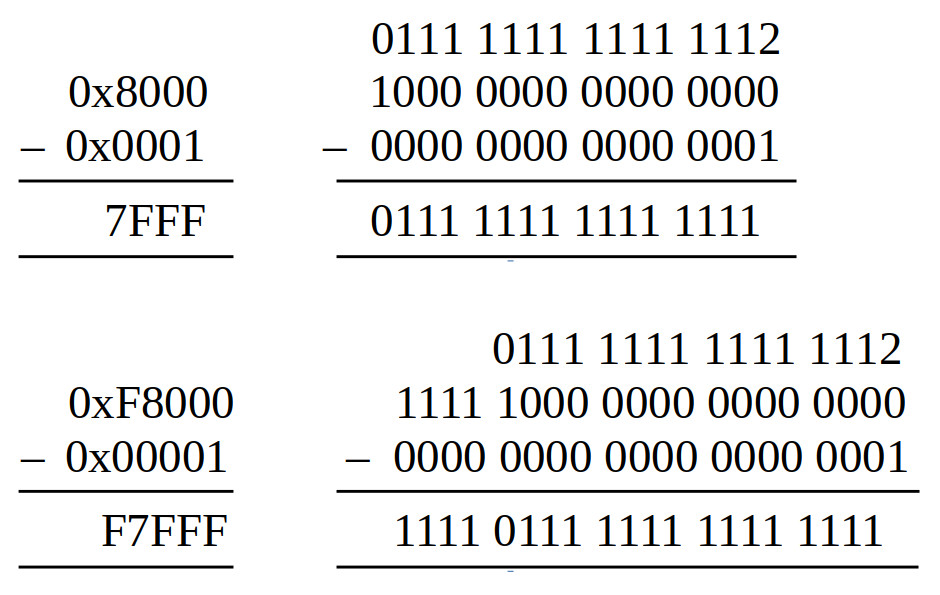
Figure 12 : 16-bit subtraction - negative overflow
Sooo, when working with signed values we need to consider overflows, sooo we need to pre-sign extend our arguments to capture any carries. Thats not to say that the previous sub16 and sub32 subroutines do not work for signed values, its just that they will not handle carries correctly. However, for the type of code we will be writing i.e. for the video games console, we could consider these as edge cases, calculations that would never occurs. The range for 16bit and 32bit values are:
16BIT
-----
integer signed            : MIN = −32768  MAX = +32767
integer unsigned          : MIN = 0       MAX = +65535
fixed-point Q8.8 signed   : MIN = −128    MAX = +127.99609375  Resolution = 0.00390625
fixed-point Q8.8 unsigned : MIN = 0       MAX = +255.99609375  Resolution = 0.00390625

32BIT
-----
integer signed              : MIN = −2,147,483,648  MAX = +2,147,483,647
integer unsigned            : MIN = 0               MAX = +4,294,967,295
fixed-point Q16.16 signed   : MIN = −32768          MAX = +32767.9999847412  Resolution = 0.0000152587890625
fixed-point Q16.16 unsigned : MIN = 0               MAX = +65535.9999847412  Resolution = 0.0000152587890625
For most calculations signed 16bit values i.e. +/- 32K will be fine. Additional thought may be needed when dealing with fixed-point values, but again, i think these subroutines should be fine, sooo, to save time being i'm going stick with what i have.
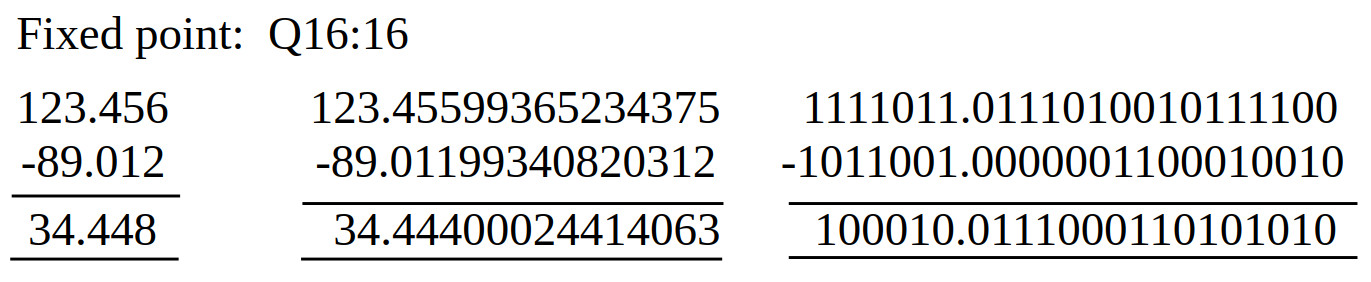
Figure 13 : fixed point subtraction
Like the fixed-point add we can use the previous integer suroutines to process our fixed-point values i.e. sub16 and sub32 subroutines. Again the key point to remember is to remember where the decimal point is when processing integer and fixed-poiint values.
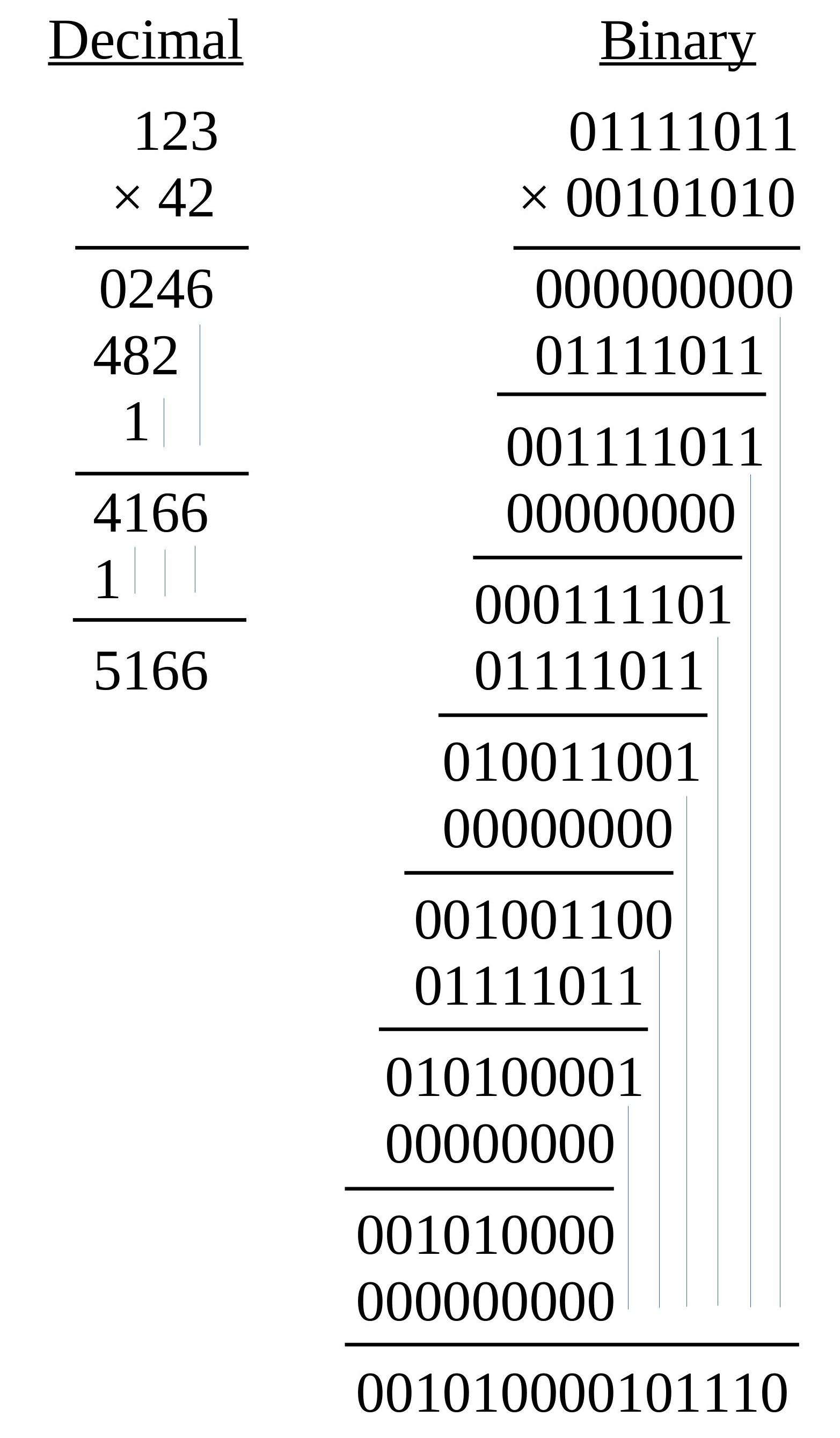
Figure 14 : multiply
The nice thing about base-2 multiplication is that when you perform long multiplication you don't have to do any "multiplication" :), i.e. when the multiplier bit is a 0 you write out 0s and when its a 1 you write out the multiplicand. The hardware just has to calculate the values: multiplicand x 0, or multiplicand x 1. These values are then added together to produce the partial product, as shown in figure 14.
The processor does have an 8bit hardware multiplier unit, producing a 16bit result, we will consider later how this could be used to multiply 16bit values, but initially i'm going to use a more general purpose multiplication algorithm (Link). There are a few different approaches to select from, but i'm going to keep it simple and go for the classic shift-and-add approach. The operation of this algorithm is described by the flowchart in figure 15.
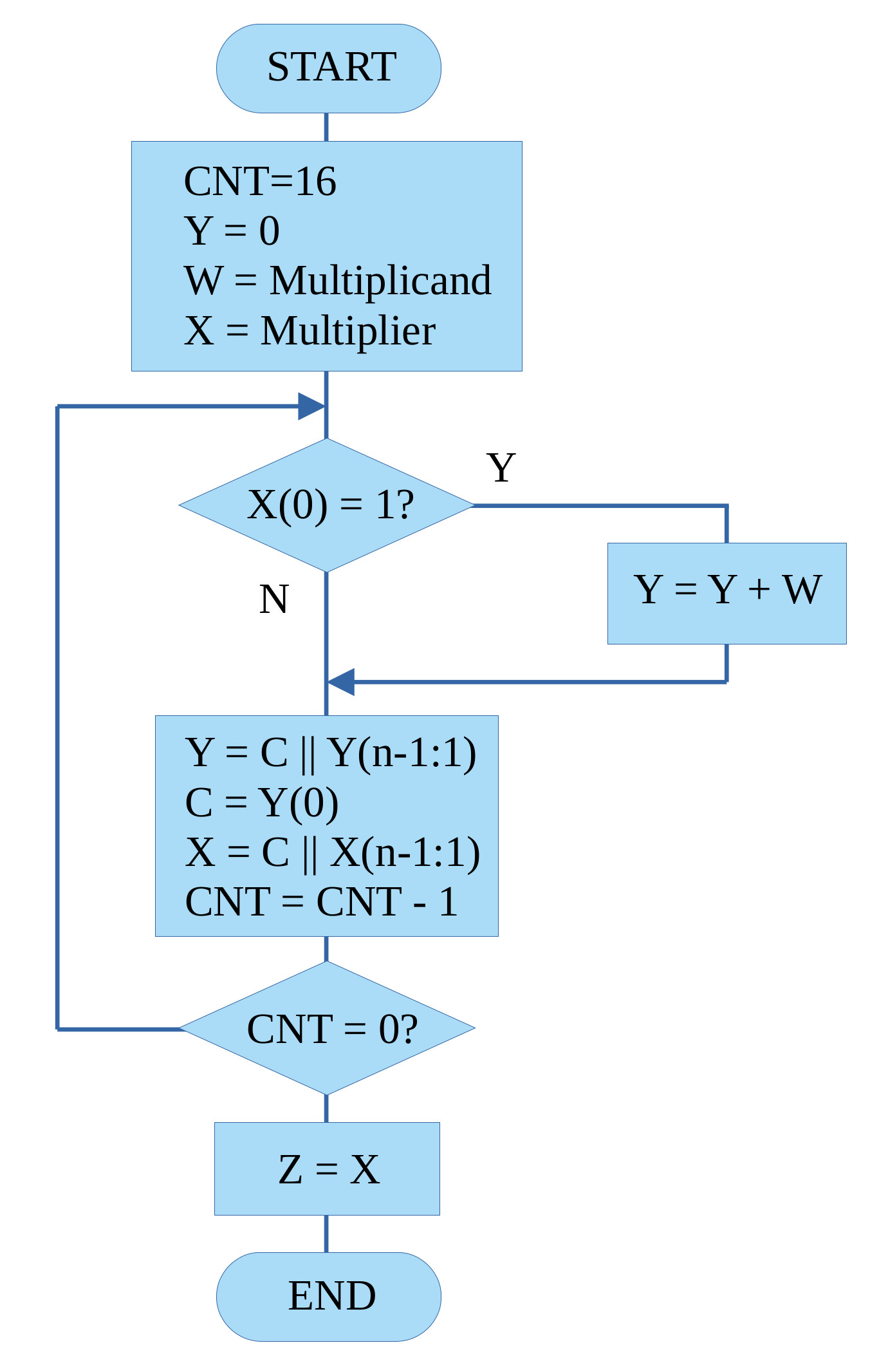
Figure 15 : shift-and-add flowchart
This algorithm follows the basic steps of binary multiplication described in figure 14. However, rather than the partial product "growing" to the left, in the software implementation we shift the partial product to the right i.e. so that addition step is always performed on the same bit positions, or to put it another way, the LSB of each partial product is not used in future calculations, so shifting this bit to the right, out of the working register is a useful thing to do :). Therefore, a key thing to identify here is that the multiplier variable X is overwritten by the result, as when performing this algorithm we only need to examine the multiplier's LSB.
Note, key thing to remember is that the Y_HIGH=Y_HIGH+W step could generate a 17bit result, sooo the carry flag (C) needs to also be shifted when the right shift is performed as this is the 17th result bit. This is automatically done when we use the SHR instruction. We do not need to test if an overflow was generated as the carry flag will be set accordingly after the add i.e. no carry C=0, carry C=1.
Test code for unsigned 16bit values stored in variables:
#################################
# TEST CODE : VARIABLES - 16bit #
#################################

start:
  jump test               # test code
fail:
  jump fail               # if simulation finished with address 1 = failed test
pass:
  jump pass               # if simulation finished with address 2 = passed test
trap:
  jump trap               # debug

data_ptr:
  .data data              # index into array
data_stop_pntr:
  .data data_end          # address of end of array

data:
  .data 0x0000            # test data 0*0=0
  .data 0x0000
  .data 0x0000            # result
  .data 0x0000
  .data 0x00FF            # test data 255*255=65025 == 0x00FF*0x00FF=0xFE01
  .data 0x00FF
  .data 0xFE01            # result
  .data 0x0000
  .data 0x0FFF            # test data 4095*4095=16769025  == 0x0FFF*0x0FFF=FFE001
  .data 0x0FFF
  .data 0xE001            # result
  .data 0x00FF
  .data 0xFFFF            # test data 65535*65535=4294836225  == 0xFFFF*0xFFFF=FFFE0001
  .data 0xFFFF
  .data 0x0001            # result
  .data 0xFFFE
data_end:
  .data 0

test:
  load ra data_ptr        # read address of data
  load ra (ra)            # read data
  store ra W              # store in working variable
  store ra 0xFFF          # print INPUT 0 to screen

  load ra data_ptr        # read address of data
  add ra 1                # increment
  store ra data_ptr
  load ra (ra)            # read test result
  store ra X              # store in working variable
  store ra 0xFFF          # print INPUT 1 to screen

  call mul16u             # process data

  load ra data_ptr        # read address of data
  add ra 1                # increment
  store ra data_ptr
  load ra (ra)            # read test result
  move rb ra

  load ra Y_LOW           # read code result
  store ra 0xFFF          # print OUTPUT to screen
  sub rb ra               # equal?
  jumpnz fail             # no, stop fail

  load ra data_ptr        # read address of data
  add ra 1                # increment
  store ra data_ptr
  load ra (ra)            # read test result
  move rb ra

  load ra Y_HIGH          # read code result
  store ra 0xFFF          # print OUTPUT to screen
  sub rb ra               # equal?
  jumpnz fail             # no, stop fail

  load ra data_ptr        # yes, inc pntr
  add ra 1
  store ra data_ptr
  subm ra data_stop_pntr  # have all tests been performed?
  jumpz pass              # yes, pass

  jump test               # no, repeat

##################
# MUL SUBROUTINE #
##################

# description: unsigned multiplication
# result (32bit) = Y_HIGH (16bit) || Y_LOW (16bit) = W (16bit) * X (16bit)
# input: W (multiplicand), X (multiplier)
# output: (high result) Y_HIGH, Y_LOW (low result)

mul16u:
  move RA 0             # zero result
  store RA Y_HIGH
  move RA 16
  store RA CNT          # Loop counter = 16 bits

mul16u_loop:
  load RA X
  and RA 1              # Test LSB of multiplier
  jumpz mul16u_no_add    # If LSB = 0, skip add

  load RA Y_HIGH        # add multiplicand to partial product
  addm RA W
  store RA Y_HIGH

mul16u_no_add:
  load RA Y_HIGH        # shift partial product
  ror RA
  store RA Y_HIGH

  load RA Y_LOW         # shift partial product
  ror RA
  store RA Y_LOW

  load RA X
  ror RA                # rotate multiplier right by 1 (next bit)
  store RA X

  load RA CNT
  sub RA 1              # Decrement counter
  store RA CNT
  jumpnz mul16u_loop     # Repeat if bits remain
  ret
To help illustrate how this algorithm works figure 16 shows the steps involved in performing the calculation: 123*42=5166 i.e. the steps needed to perform the multiplication shown in figure 14. To process these 16bit values we need to examine each multiplier bit, sooo, there will be 16 steps, in which data i.e. multiplicand and partial product, is added and shifted.
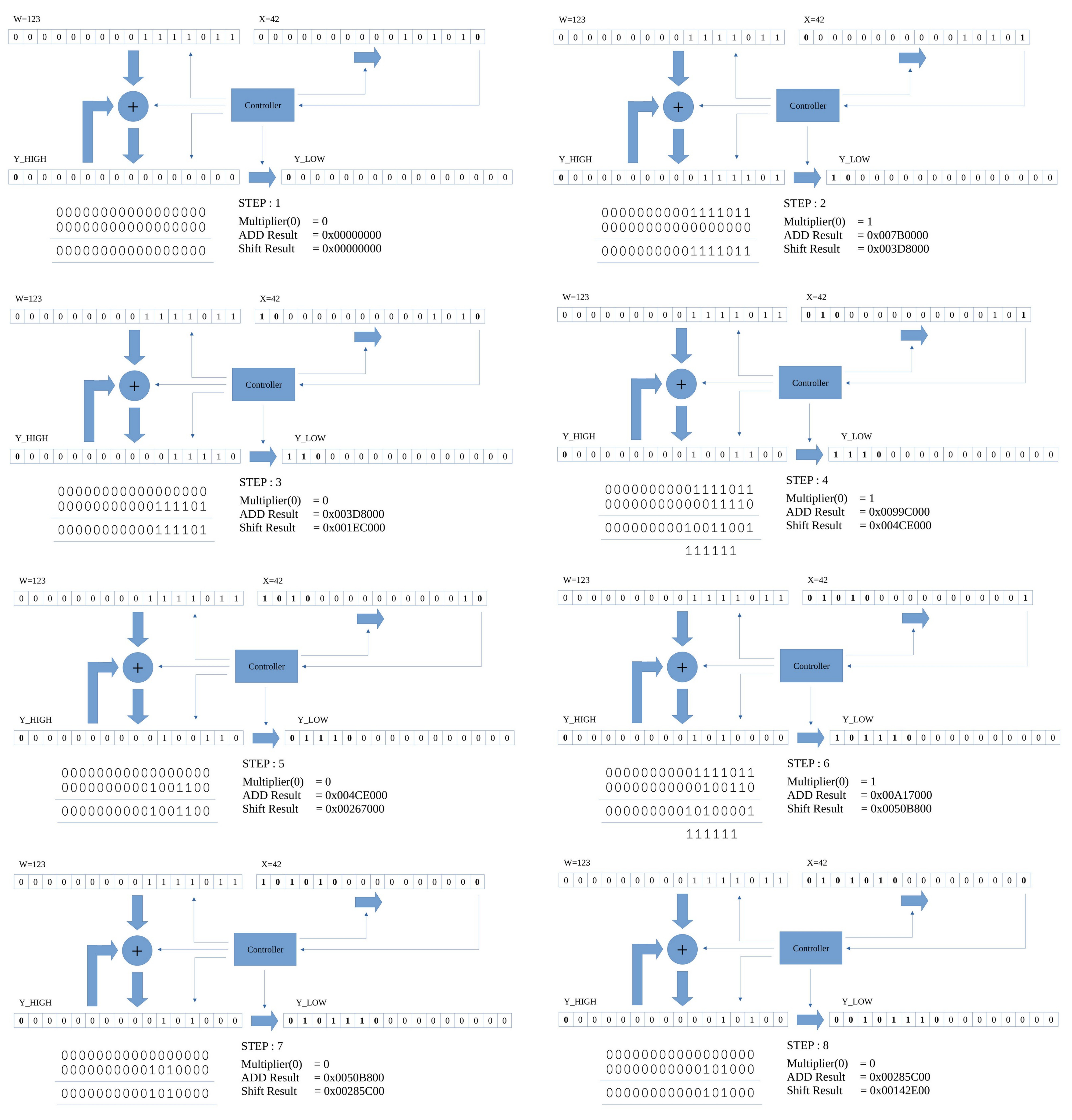
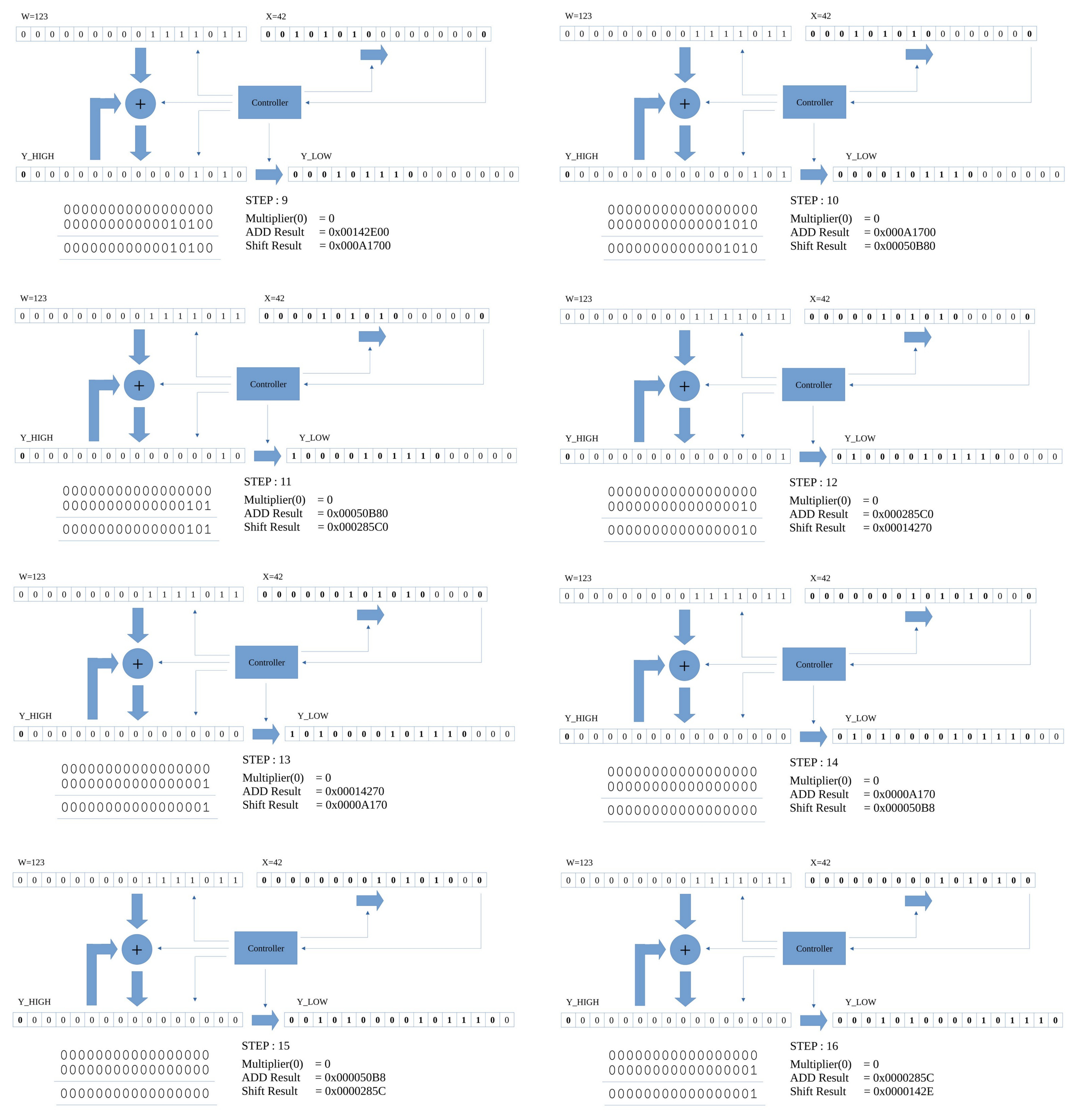
Figure 16 : shift-and-add steps
Note, an N-bit * M-bit calculation will produce a N+M-bit result, sooo, the previous 16bit * 16bit calculation will generate a 32bit result.
Test code for unsigned 32bit values stored in variables:
#################################
# TEST CODE : VARIABLES - 32bit #
#################################

start:
  jump test               # test code
fail:
  jump fail               # if simulation finished with address 1 = failed test
pass:
  jump pass               # if simulation finished with address 2 = passed test
trap:
  jump trap               # debug

data_ptr:
  .data data              # index into array
data_stop_pntr:
  .data data_end          # address of end of array

data:
  .data 0x0000            # test data 0*0=0
  .data 0x0000
  .data 0x0000
  .data 0x0000
  .data 0x0000            # result
  .data 0x0000
  .data 0x0000
  .data 0x0000
  .data 0x00FF            # test data 255*255=65025 == 0x00FF*0x00FF=0xFE01
  .data 0x0000
  .data 0x00FF
  .data 0x0000
  .data 0xFE01            # result
  .data 0x0000
  .data 0x0000
  .data 0x0000
  .data 0x0FFF            # test data 4095*4095=16769025  == 0x0FFF*0x0FFF=FFE001
  .data 0x0000
  .data 0x0FFF
  .data 0x0000
  .data 0xE001            # result
  .data 0x00FF
  .data 0x0000
  .data 0x0000
  .data 0xFFFF            # test data 65535*65535=4294836225  == 0xFFFF*0xFFFF=FFFE0001
  .data 0x0000
  .data 0xFFFF
  .data 0x0000
  .data 0x0001            # result
  .data 0xFFFE
  .data 0x0000
  .data 0x0000
data_end:
  .data 0

test:
  load ra data_ptr        # read address of data
  load ra (ra)            # read data
  store ra W_LOW          # store in working variable
  store ra 0xFFF          # print INPUT 0 LOW to screen

  load ra data_ptr        # read address of data
  add ra 1                # increment
  store ra data_ptr
  load ra (ra)            # read test result
  store ra W_HIGH         # store in working variable
  store ra 0xFFF          # print INPUT 0 HIGH to screen

  load ra data_ptr        # read address of data
  add ra 1                # increment
  store ra data_ptr
  load ra (ra)            # read test result
  store ra X_LOW          # store in working variable
  store ra 0xFFF          # print INPUT 1 LOW to screen

  load ra data_ptr        # read address of data
  add ra 1                # increment
  store ra data_ptr
  load ra (ra)            # read test result
  store ra X_HIGH         # store in working variable
  store ra 0xFFF          # print INPUT 1 HIGH to screen

  call mul32u             # process data

  load ra data_ptr        # read address of data
  add ra 1                # increment
  store ra data_ptr
  load ra (ra)            # read test result
  move rb ra

  load ra Y_LOW           # read code result
  store ra 0xFFF          # print OUTPUT to screen
  sub rb ra               # equal?
  jumpnz fail             # no, stop fail

  load ra data_ptr        # read address of data
  add ra 1                # increment
  store ra data_ptr
  load ra (ra)            # read test result
  move rb ra

  load ra Y_HIGH          # read code result
  store ra 0xFFF          # print OUTPUT to screen
  sub rb ra               # equal?
  jumpnz fail             # no, stop fail

  load ra data_ptr        # read address of data
  add ra 1                # increment
  store ra data_ptr
  load ra (ra)            # read test result
  move rb ra

  load ra Z_LOW           # read code result
  store ra 0xFFF          # print OUTPUT to screen
  sub rb ra               # equal?
  jumpnz fail             # no, stop fail

  load ra data_ptr        # read address of data
  add ra 1                # increment
  store ra data_ptr
  load ra (ra)            # read test result
  move rb ra

  load ra Z_HIGH          # read code result
  store ra 0xFFF          # print OUTPUT to screen
  sub rb ra               # equal?
  jumpnz fail             # no, stop fail

  load ra data_ptr        # yes, inc pntr
  add ra 1
  store ra data_ptr
  subm ra data_stop_pntr  # have all tests been performed?
  jumpz pass              # yes, pass

  jump test               # no, repeat

##################
# MUL SUBROUTINE #
##################

# description: unsigned multiplication
# result (64bit) = Z_HIGH (16bit) || Z_LOW (16bit) || Y_HIGH (16bit) || Y_LOW (16bit) = (W_HIGH (16bit) || W_LOW (16bit)) *
#                                                                                       (X_HIGH (16bit) || X_LOW (16bit))
# input: W_HIGH || W_LOW (multiplicand), X_HIGH || X_LOW (multiplier)
# output: (high result) Z_HIGH (16bit) || Z_LOW (16bit) || Y_HIGH (16bit) || Y_LOW (16bit) (low result)

mul32u:
    move ra 0              # zero high 32bits of partial product
    store ra Z_LOW
    store ra Z_HIGH

    load ra X_LOW          # make a copy of X to restore at end
    store ra TMP_LOW
    load ra X_HIGH
    store ra TMP_HIGH

    move ra 32             # set loop counter to 32 bits
    store ra CNT

mul32u_loop:
    load ra X_LOW          # test multiplier LSB
    and ra 1
    jumpz mul32u_no_add

    load ra Z_LOW          # add multiplicand to partial product
    addm ra W_LOW
    store ra Z_LOW

    load ra Z_HIGH
    addmc ra W_HIGH
    store ra Z_HIGH

mul32u_no_add:
    load ra Z_HIGH         # shift partial product
    ror ra
    store ra Z_HIGH

    load ra Z_LOW
    ror ra
    store ra Z_LOW

    load ra Y_HIGH
    ror ra
    store ra Y_HIGH

    load ra Y_LOW
    ror ra
    store ra Y_LOW

    load ra X_HIGH         # shift multiplier (X)
    shr ra                 # to simplify restore later X is copied into TMP
    store ra X_HIGH        # so in this version zeros are shifted into X

    load ra X_LOW
    ror ra
    store ra X_LOW

    load ra CNT           # have all 32 bits been processed
    sub ra 1
    store ra CNT
    jumpnz mul32u_loop

    load ra TMP_LOW       # restore original version of X
    store ra X_LOW
    load ra TMP_HIGH
    store ra X_HIGH
    ret
Note, an N-bit * M-bit calculation will produce a N+M-bit result, sooo, the previous 32bit * 32bit calculation will generate a 64bit result.
These multiplication subroutines only process unsigned values. To process signed values we have to follow these rules:
+ * + = +
- * + = -
+ * - = -
- * - = +
There are multiplication algorithms that can process signed values, but a simpler solution is to test the signed of the multiplier and multiplicand, convert everything to unsigned, perform the multiplication and apply these rules to result i.e. call the neg16 subroutine if needed.
Test code for signed 16bit values stored in variables:
#################################
# TEST CODE : VARIABLES - 16bit #
#################################

start:
  jump test               # test code
fail:
  jump fail               # if simulation finished with address 1 = failed test
pass:
  jump pass               # if simulation finished with address 2 = passed test
trap:
  jump trap               # debug

data_ptr:
  .data data              # index into array
data_stop_pntr:
  .data data_end          # address of end of array

data:
  .data 0x0000            # test data 0*0=0
  .data 0x0000
  .data 0x0000            # result
  .data 0x0000
  .data 0x00FF            # test data 255*255=65025 == 0x00FF*0x00FF=0xFE01
  .data 0x00FF
  .data 0xFE01            # result
  .data 0x0000
  .data 0x0FFF            # test data 4095*4095=16769025 == 0x0FFF*0x0FFF=FFE001
  .data 0x0FFF
  .data 0xE001            # result
  .data 0x00FF
  .data 0xFFFF            # test data 65535*65535=4294836225 == 0xFFFF*0xFFFF=FFFE0001
  .data 0xFFFF
  .data 0x0001            # result
  .data 0xFFFE
data_end:
  .data 0

test:
  load ra data_ptr        # read address of data
  load ra (ra)            # read data
  store ra W              # store in working variable
  store ra 0xFFF          # print INPUT 0 to screen

  load ra data_ptr        # read address of data
  add ra 1                # increment
  store ra data_ptr
  load ra (ra)            # read test result
  store ra X              # store in working variable
  store ra 0xFFF          # print INPUT 1 to screen

  call mul16              # process data

  load ra data_ptr        # read address of data
  add ra 1                # increment
  store ra data_ptr
  load ra (ra)            # read test result
  move rb ra

  load ra Y_LOW           # read code result
  store ra 0xFFF          # print OUTPUT to screen
  sub rb ra               # equal?
  jumpnz fail             # no, stop fail

  load ra data_ptr        # read address of data
  add ra 1                # increment
  store ra data_ptr
  load ra (ra)            # read test result
  move rb ra

  load ra Y_HIGH          # read code result
  store ra 0xFFF          # print OUTPUT to screen
  sub rb ra               # equal?
  jumpnz fail             # no, stop fail

  load ra data_ptr        # yes, inc pntr
  add ra 1
  store ra data_ptr
  subm ra data_stop_pntr  # have all tests been performed?
  jumpz pass              # yes, pass

  jump test               # no, repeat

##################
# MUL SUBROUTINE #
##################

# description: signed multiplication
# result (32bit) = Y_HIGH (16bit) || Y_LOW (16bit) = W (16bit) * X (16bit)
# input: W (multiplicand), X (multiplier)
# output: (high result) Y_HIGH, Y_LOW (low result)

mul16:
  move ra 0           # zero neg counter
  store ra TMP

mul16_t1:
  load ra W           # read W
  store ra TMP_1      # buffer so that it can be restored later
  shl ra
  jumpnc mul16_t2     # is MSB set?

  load ra TMP         # yes, inc neg counter
  add ra 1
  store ra TMP

  move ra 0xFF        # convert to positive value
  subm ra W           # subtract data to invert
  add ra 1            # increment
  store ra W          # save result

mul16_t2:
  load ra X           # read X
  store ra TMP_2      # buffer so that it can be restored later
  shl ra
  jumpnc mul16_calc   # is MSB set?

  load ra TMP         # yes, inc neg counter
  add ra 1
  store ra TMP

  move ra 0xFF        # convert to positive value
  subm ra X           # subtract data to invert
  add ra 1            # increment
  store ra Y          # save result

mul16_calc:
  call mul16u

  load ra TMP
  and ra 3
  jumpz mul16_exit
  and ra 2
  jumpnz mul16_exit

  load ra Y_LOW
  store ra X_LOW
  load ra Y_HIGH
  store ra X_LOW

  call neg16

mul16_exit:
  load ra TMP_1
  store ra W
  load ra TMP_2
  store ra X
  ret
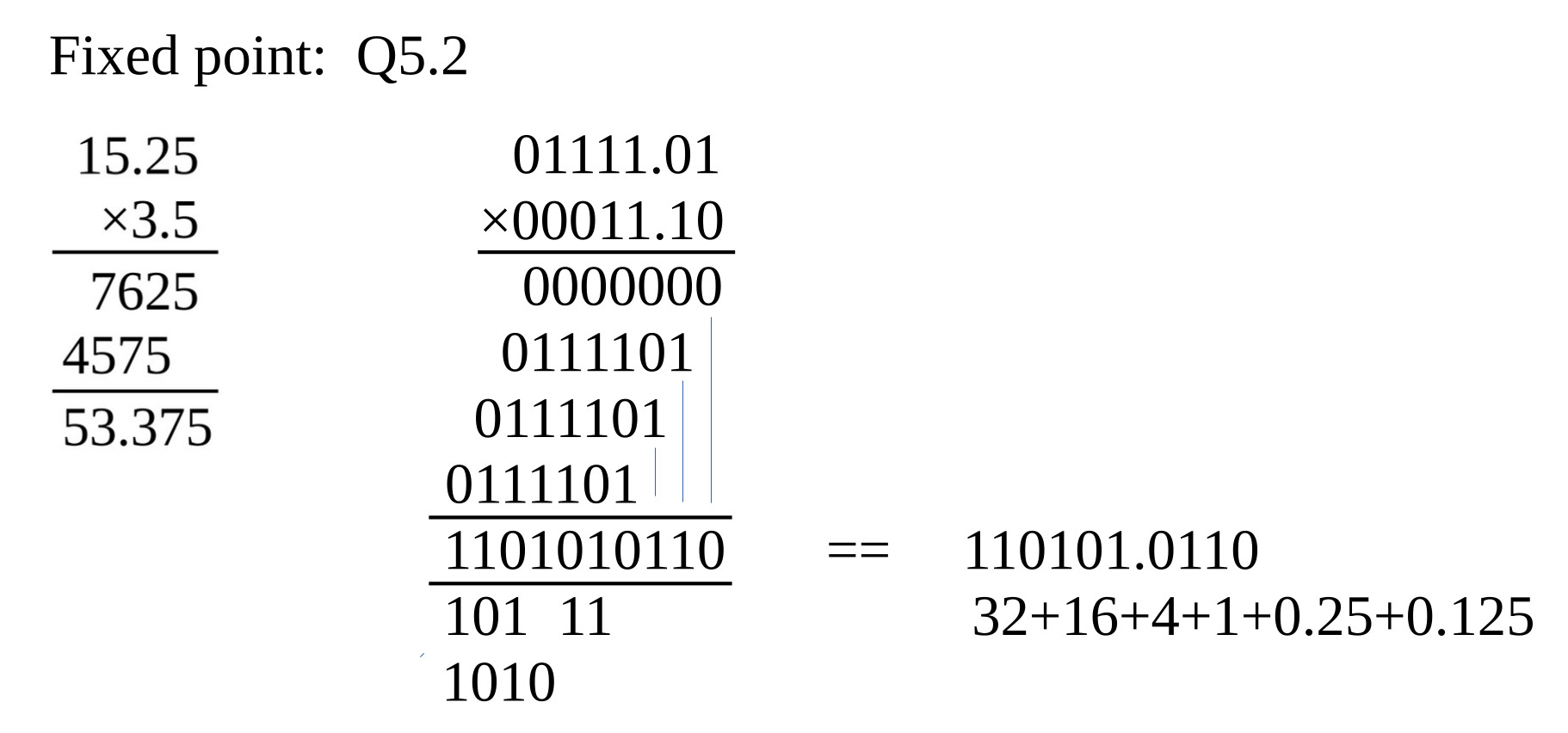
Figure 17 : fixed point multiplication
The previous mul16 and mul32 subroutines can again be used to perform fixed-point calculations. However, the position of the decimal point will move, as shown in the Q5.2 example below:
Q5.2 = 7bit
7bit * 7bit = 14bit
XXXXX.XX * XXXXX.XX = XXXXXXXXX.XXXX
The Q5.2 values (7bit) have an imaginary decimal point located two bits from the LSB bit. However, the result is a Q10.4 value (14bit), sooo its decimal point position is 4bits from the LSB bit, therefore, to use this result e.g. to add this result to another Q5.2 value, you would either need to shift the Q10.4 value to the right two times i.e. convert it to a Q10.2 fixed point value, or extend the other Q5.2 value to a Q10.4. For both cases you need to align the decimal point.
The processor has an 8bit unsigned multiplier that can perform an 8bit * 8bit calculation to produce an 16bit result. This can also be used to perform 16bit * 16bit and 32bit * 32bit calculations. Like the 32bit addition and subtraction examples the trick is to break these calculation down into "chunks", a HIGH 8bit and LOW 8bit chunks that can be processed by the processor. However, this does not improve processing performance owing to the associated overheads, as shown below:
A16 * B16 = ((A_HIGH_8bits * 256) + A_LOW_8bits) * ((B_HIGH_8bits * 256) + B_LOW_8bits)
                      W           +      X                   Y           +       Z

A16 * B16 = (W + X) * (Y + Z)
A16 * B16 = W*Y + W*Z + X*Y + X*Z

A16 * B16 = (A_HIGH_8bits * B_HIGH_8bits * 65536) + (A_HIGH_8bits * B_LOW_8bits *256) +
            (A_LOW_8bits * B_HIGH_8bits * 256) + (A_LOW_8bits * B_LOW_8bits)


Note, *256 and *65536 can be done with ASL / MUL instructions, or simply writing the result to the correct variable.

Example 0x123 * 0x456 = 0x4EDC2

A_HIGH_8bits = 0x01
A_LOW_8bits  = 0x23
B_HIGH_8bits = 0x04
B_LOW_8bits  = 0x56

(A_HIGH_8bits * B_HIGH_8bits * 65536) + (A_HIGH_8bits * B_LOW_8bits *256) +
(A_LOW_8bits * B_HIGH_8bits * 256) + (A_LOW_8bits * B_LOW_8bits)

Total = (0x01 * 0x04 * 65536) + (0x01 * 0x56 *256) + (0x23 * 0x04 * 256) + (0x23 * 0x56)
      =      262144           +        22016       +         35840       +     3010
      = 323010 = 0x4EDC2
Test code for unsigned 16bit values stored in variables:
#################################
# TEST CODE : VARIABLES - 16bit #
#################################

start:
  jump test               # test code
fail:
  jump fail               # if simulation finished with address 1 = failed test
pass:
  jump pass               # if simulation finished with address 2 = passed test
trap:
  jump trap               # debug

data_ptr:
  .data data              # index into array
data_stop_pntr:
  .data data_end          # address of end of array

data:
  .data 0x0000            # test data 0*0=0
  .data 0x0000
  .data 0x0000            # result
  .data 0x0000
  .data 0x00FF            # test data 255*255=65025 == 0x00FF*0x00FF=0xFE01
  .data 0x00FF
  .data 0xFE01            # result
  .data 0x0000
  .data 0x0FFF            # test data 4095*4095=16769025  == 0x0FFF*0x0FFF=FFE001
  .data 0x0FFF
  .data 0xE001            # result
  .data 0x00FF
  .data 0xFFFF            # test data 65535*65535=4294836225  == 0xFFFF*0xFFFF=FFFE0001
  .data 0xFFFF
  .data 0x0001            # result
  .data 0xFFFE
data_end:
  .data 0

test:
  load ra data_ptr        # read address of data
  load ra (ra)            # read data
  store ra W              # store in working variable
  store ra 0xFFF          # print INPUT 0 to screen

  load ra data_ptr        # read address of data
  add ra 1                # increment
  store ra data_ptr
  load ra (ra)            # read test result
  store ra X              # store in working variable
  store ra 0xFFF          # print INPUT 1 to screen

  call mul16hw            # process data

  load ra data_ptr        # read address of data
  add ra 1                # increment
  store ra data_ptr
  load ra (ra)            # read test result
  move rb ra

  load ra Y_LOW           # read code result
  store ra 0xFFF          # print OUTPUT to screen
  sub rb ra               # equal?
  jumpnz fail             # no, stop fail

  load ra data_ptr        # read address of data
  add ra 1                # increment
  store ra data_ptr
  load ra (ra)            # read test result
  move rb ra

  load ra Y_HIGH          # read code result
  store ra 0xFFF          # print OUTPUT to screen
  sub rb ra               # equal?
  jumpnz fail             # no, stop fail

  load ra data_ptr        # yes, inc pntr
  add ra 1
  store ra data_ptr
  subm ra data_stop_pntr  # have all tests been performed?
  jumpz pass              # yes, pass

  jump test               # no, repeat

##################
# MUL SUBROUTINE #
##################

# description: unsigned multiplication
# result (32bit) = Y_HIGH (16bit) || Y_LOW (16bit) = W (16bit) * X (16bit)
# input: W (multiplicand), X (multiplier)
# output: (high result) Y_HIGH, Y_LOW (low result)
# temp: TMP_0=W_LOW, TMP_1=W_HIGH, TMP_2=X_LOW, TMP_3=X_HIGH

mul16hw:
  move ra 0
  store ra Y_LOW     # zero acc variables
  store ra Y_HIGH
  store ra Z_LOW
  store ra Z_HIGH

  moveh rb 0xFF      # extract high 8bit values
  load ra W
  and ra rb
  store ra TMP_1
  load ra X
  and ra rb
  store ra TMP_3

  moveu rb 0xFF      # extract low 8bit values
  load ra W
  and ra rb
  store ra TMP_0
  load ra X
  and ra rb
  store ra TMP_2

  # (A_LOW_8bits * B_LOW_8bits)

  load ra TMP_0
  move rb ra
  load ra TMP_2
  mulu ra rb
  store ra W_LOW
  move ra 0
  store ra W_HIGH
  call acc32

  # (A_LOW_8bits * B_HIGH_8bits * 256)

  load ra TMP_0
  move rb ra
  load ra TMP_3
  mulu ra rb
  move rb 0
  shl ra           # x2
  rol rb
  shl ra           # x4
  rol rb
  shl ra           # x8
  rol rb
  shl ra           # x16
  rol rb
  shl ra           # x32
  rol rb
  shl ra           # x64
  rol rb
  shl ra           # x128
  rol rb
  shl ra           # x256
  rol rb
  store ra W_LOW
  move ra rb
  store ra W_HIGH
  call acc32

  # (A_HIGH_8bits * B_LOW_8bits *256)

  load ra TMP_1
  move rb ra
  load ra TMP_2
  mulu ra rb
  move rb 0
  shl ra           # x2
  rol rb
  shl ra           # x4
  rol rb
  shl ra           # x8
  rol rb
  shl ra           # x16
  rol rb
  shl ra           # x32
  rol rb
  shl ra           # x64
  rol rb
  shl ra           # x128
  rol rb
  shl ra           # x256
  rol rb
  store ra W_LOW
  move ra rb
  store ra W_HIGH
  call acc32

  # (A_HIGH_8bits * B_HIGH_8bits * 65536)

  load ra TMP_1
  move rb ra
  load ra TMP_3
  mulu ra rb
  store ra W_HIGH
  move ra 0
  store ra W_LOW
  call acc32
  ret
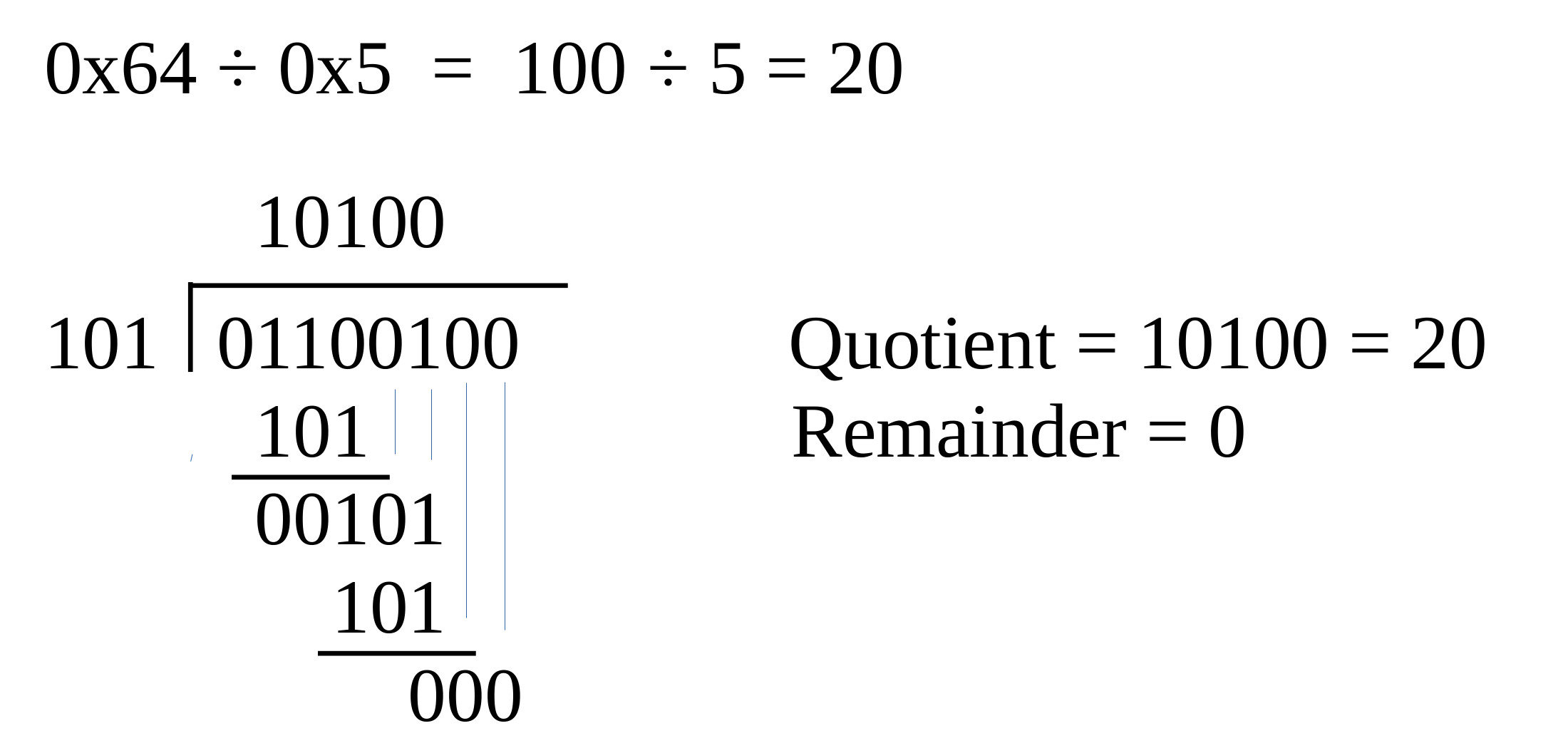
Figure 18 : division - no remainder
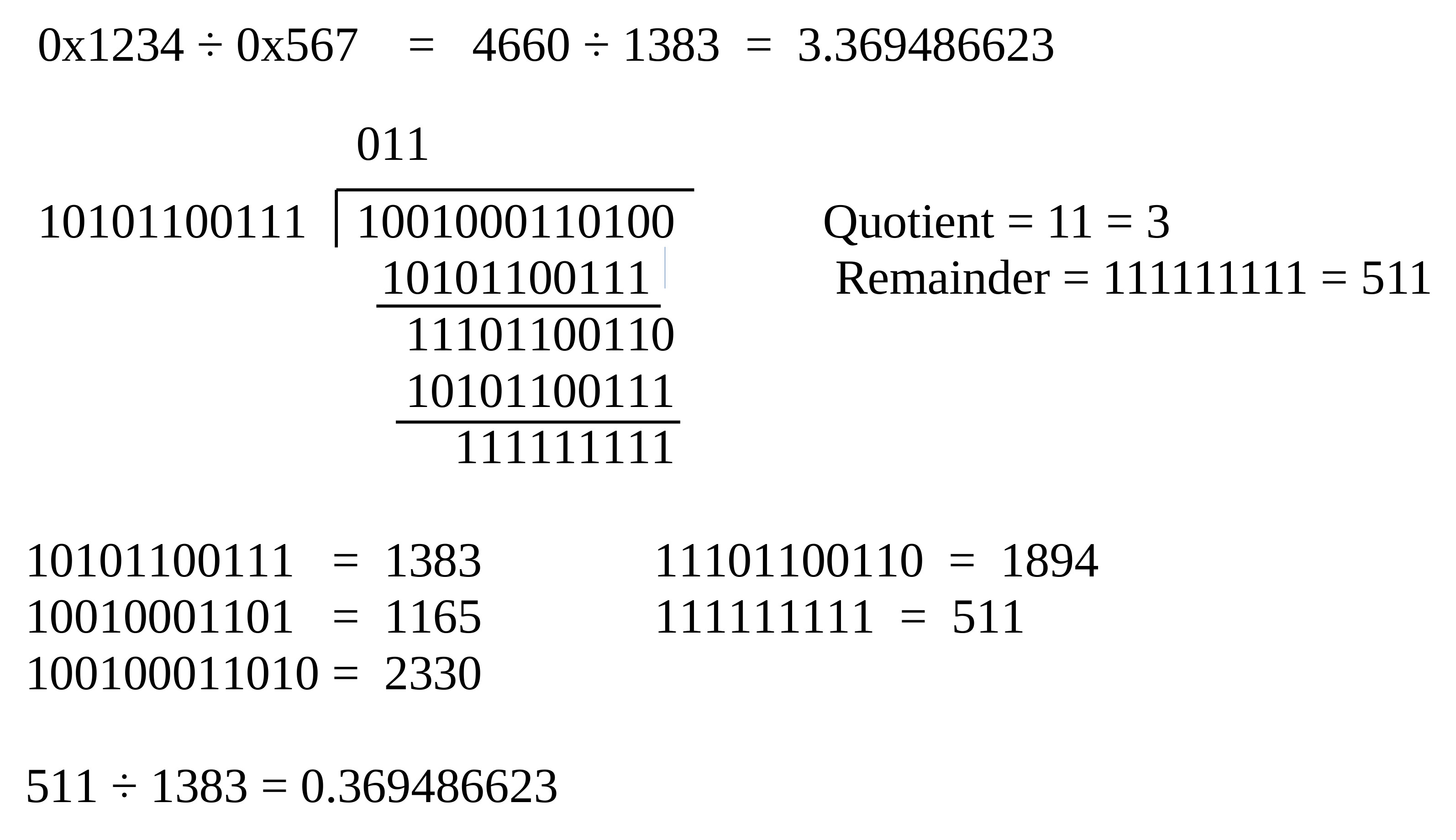
Figure 19 : division - remainder
This function is not directly supported by the processor's hardware. Like multiplication there are a lot of different algorithms to chose from (Link), but i'm going to keep it simple and go again for the classic shift and subtract approach i.e. the restoring division algorithm (Link). The operation of this algorithm is described by the flowchart in figure 20.
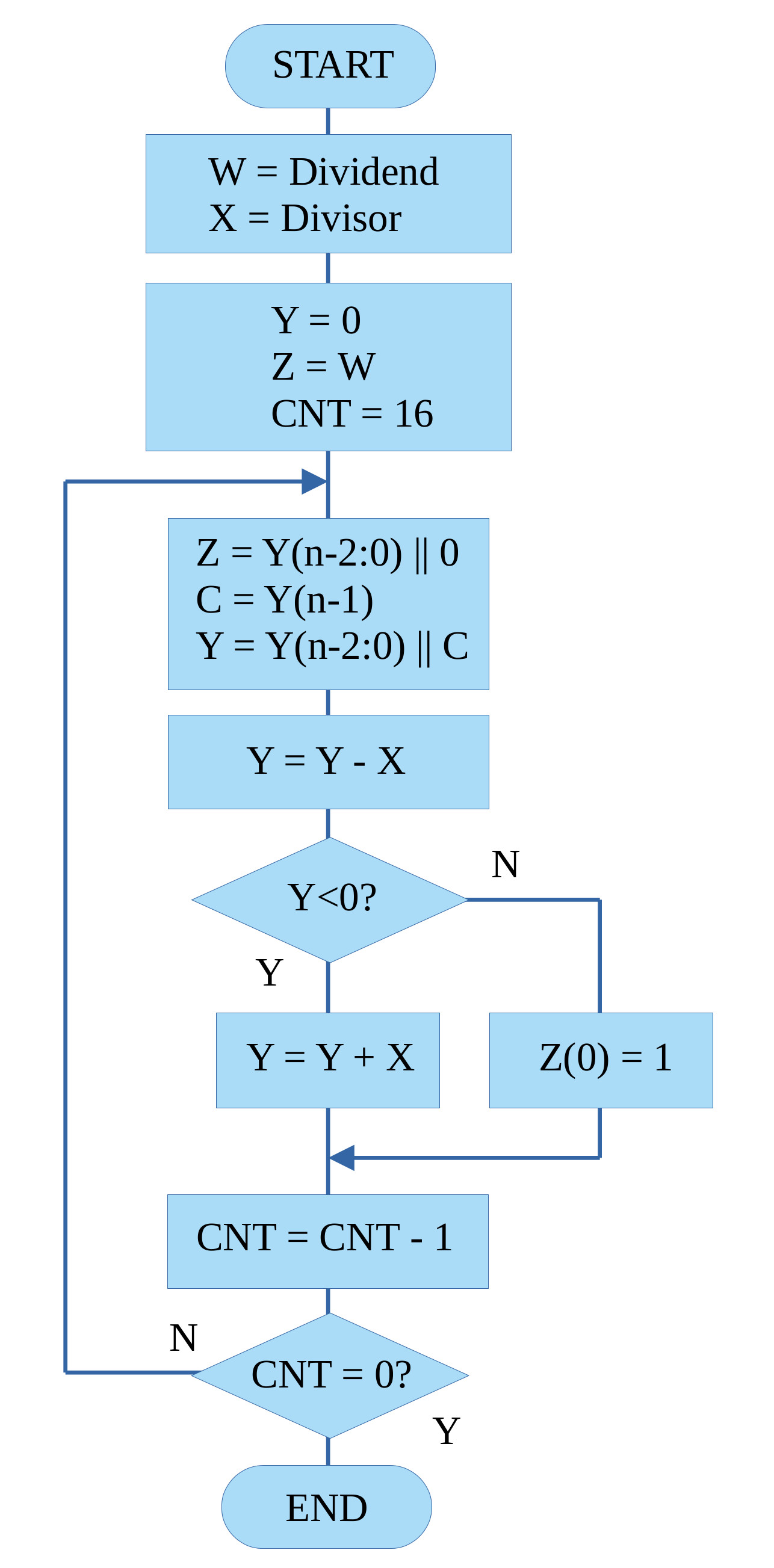
Figure 20 : division flowchart
This algorithm repeatedly tests to see if the divisor can be subtracted from the section of the dividend being processed. If it can, that bit position in the quotient is set to 1, otherwise its set to 0. The term restoring is use to describe what happens in the event that the divisor can not be subtracted i.e. the divisor is bigger than section of the dividend, a negative result is produced at the end of the subtraction phase. When performing long division manually this step is just ignored, but when implemented in software we need to undo this subtraction step, sooo to restore the part of the dividend being processed we add back the divisor. To illustrate this process consider the steps shown below performing 100 divided by 5:
   100     00000000 00000000 00000000 01100100 = Dividend = YZ
     5     00000000 00000000 00000000 00000101 = Divisor  = X

STEP  OPERATION       Y                 Z
1     shift   00000000 00000000 00000000 11001000
2     shift   00000000 00000000 00000001 10010000
3     shift   00000000 00000000 00000011 00100000
4     shift   00000000 00000000 00000110 01000000
5     shift   00000000 00000000 00001100 10000000
6     shift   00000000 00000000 00011001 00000000
7     shift   00000000 00000000 00110010 00000000
8     shift   00000000 00000000 01100100 00000000
9     shift   00000000 00000000 11001000 00000000
10    shift   00000000 00000001 10010000 00000000
11    shift   00000000 00000011 00100000 00000000
12    shift   00000000 00000110 01000000 00000000
      sub 5   00000000 00000101 01000000 00000000
      result  00000000 00000001 01000000 00000001
13    shift   00000000 00000010 10000000 00000010
14    shift   00000000 00000101 00000000 00000100
      sub 5   00000000 00000101 00000000 00000100
      result  00000000 00000000 00000000 00000101
15    shift   00000000 00000000 00000000 00001010
16    shift   00000000 00000000 00000000 00010100
Note, the restore phase is not show to save space e.g. in steps 1 to 11 where the Y register contains a value less than 5 i.e. 101. In these cases subtracting 5 would generate a negative result. When this is detected, 5 is added to Y to undo the previous subtraction, then the Y and Z variables are shifted to the left 1bit position, adding a new digit.
This division algorithm produces a quotient and a remainder i.e. integer results, it does not produce a fractional representation i.e. a fixed-point number. To represent a fractional term we would need to move to a fixed point representation as shown in figure 21. Here we have a 16bit integer part and an 8bit fractional part. Therefore, there may be resolution issues i.e. can you represent the fractional term i.e. the remainder, in the given the fixed number of fractional bits :(.
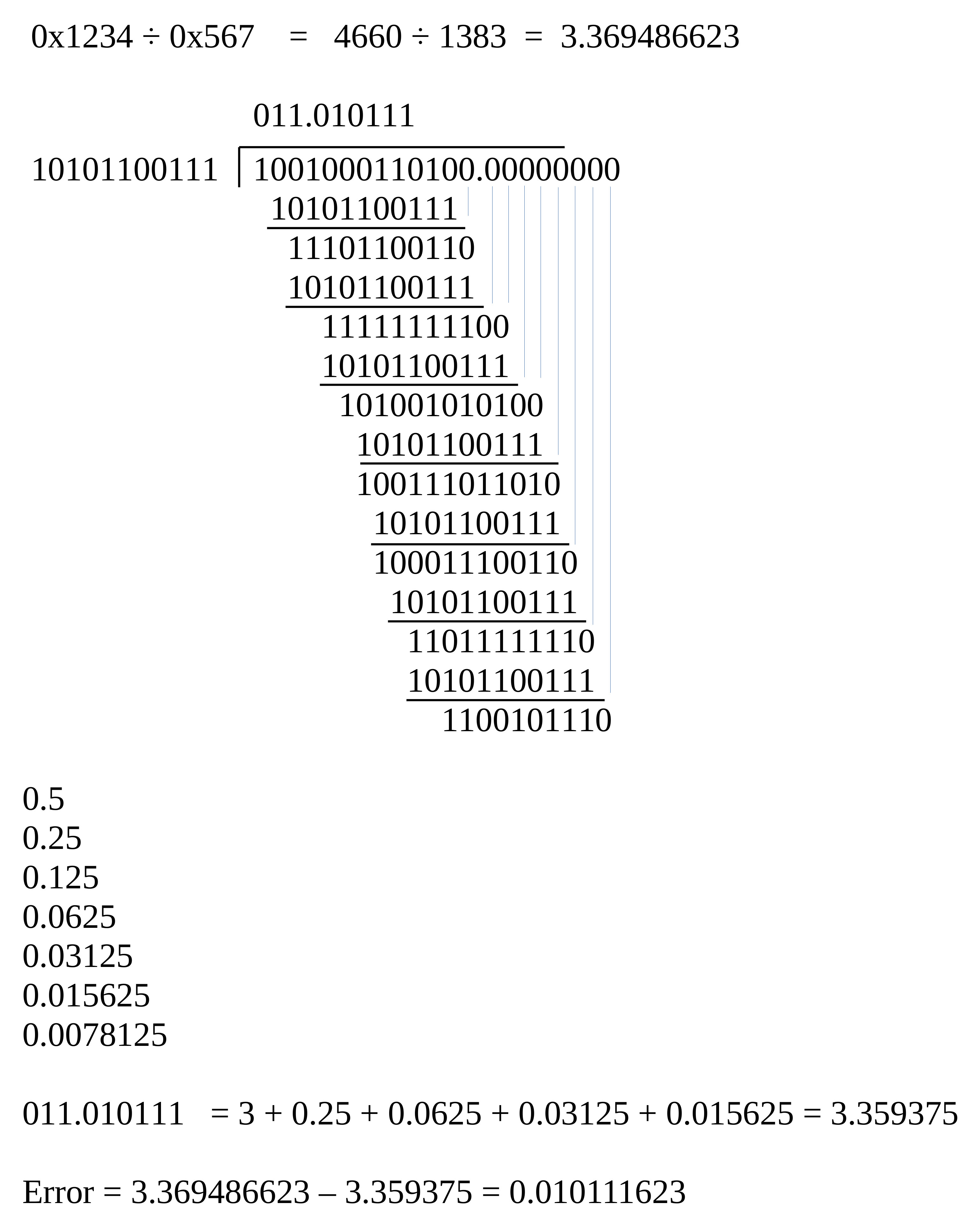
Figure 21 : fixed point division
Test code for unsigned 16bit values stored in variables:
#################################
# TEST CODE : VARIABLES - 16bit #
#################################

start:
  jump test               # test code
fail:
  jump fail               # if simulation finished with address 1 = failed test
pass:
  jump pass               # if simulation finished with address 2 = passed test
trap:
  jump trap               # debug

data_ptr:
  .data data              # index into array
data_stop_pntr:
  .data data_end          # address of end of array

data:
  .data 0x0000            # test data 0*0=0
  .data 0x0000
  .data 0x0000            # result
  .data 0x0000
  .data 0x00FF            # test data 255*255=65025 == 0x00FF*0x00FF=0xFE01
  .data 0x00FF
  .data 0xFE01            # result
  .data 0x0000
  .data 0x0FFF            # test data 4095*4095=16769025 == 0x0FFF*0x0FFF=FFE001
  .data 0x0FFF
  .data 0xE001            # result
  .data 0x00FF
  .data 0xFFFF            # test data 65535*65535=4294836225 == 0xFFFF*0xFFFF=FFFE0001
  .data 0xFFFF
  .data 0x0001            # result
  .data 0xFFFE
data_end:
  .data 0

test:
  load ra data_ptr        # read address of data
  load ra (ra)            # read data
  store ra W              # store in working variable
  store ra 0xFFF          # print INPUT 0 to screen

  load ra data_ptr        # read address of data
  add ra 1                # increment
  store ra data_ptr
  load ra (ra)            # read test result
  store ra X              # store in working variable
  store ra 0xFFF          # print INPUT 1 to screen

  call div16u             # process data

  load ra data_ptr        # read address of data
  add ra 1                # increment
  store ra data_ptr
  load ra (ra)            # read test result
  move rb ra

  load ra Y_LOW           # read code result
  store ra 0xFFF          # print OUTPUT to screen
  sub rb ra               # equal?
  jumpnz fail             # no, stop fail

  load ra data_ptr        # read address of data
  add ra 1                # increment
  store ra data_ptr
  load ra (ra)            # read test result
  move rb ra

  load ra Y_HIGH          # read code result
  store ra 0xFFF          # print OUTPUT to screen
  sub rb ra               # equal?
  jumpnz fail             # no, stop fail

  load ra data_ptr        # yes, inc pntr
  add ra 1
  store ra data_ptr
  subm ra data_stop_pntr  # have all tests been performed?
  jumpz pass              # yes, pass

  jump test               # no, repeat

##################
# DIV SUBROUTINE #
##################

# description: unsigned division
# result = Y (16bit) Quotient, Z (16bit) Remainder = W (16bit) / X (16bit)
# input: W (Dividend), X (Divisor)
# output: Y (Quotient), Z (Remainder)

div16u:
  load RA W
  store RA Z
  move RA 0
  store RA Y
  move RA 16
  store RA CNT

div16u_loop:
  load RA Z
  shl RA
  store RA Z

  load RA Y
  rol RA
  store RA Y

  load RA Y
  subm RA X
  store RA Y
  jumpn div16u_restore

  load RA Z
  add RA 1
  store RA Z
  jump div16u_update

div16u_restore:
  load RA Y
  addm RA X
  store RA Y

div16u_update:
  load RA CNT
  sub RA 1
  store RA CNT
  jumpnz div16u_loop

  ret
Confess have not got round to implementing an unsigned 32bit division, signed division 16bit, signed division 32bit, or division via the multiplication of a fixed-point number i.e. multiplying by a fraction, 100 * 0.125 etc.
A key requirement for any program is to test if a variable is equal, bigger, or smaller than another value e.g. IF-THEN-ELSE, FOR-LOOPS, WHILE-LOOPs etc.
Is W less-than X, if true store 1 in Y, if false store 0 in Y.
#################################
# TEST CODE : VARIABLES - 16bit #
#################################

start:
  jump test               # test code
fail:
  jump fail               # if simulation finished with address 1 = failed test
pass:
  jump pass               # if simulation finished with address 2 = passed test
trap:
  jump trap               # debug

data_ptr:
  .data data              # index into array
data_stop_pntr:
  .data data_end          # address of end of array

data:
  .data 0x0000            # test data 0*0=0
  .data 0x0000
  .data 0x0000            # result
  .data 0x0000
  .data 0x00FF            # test data 255*255=65025 == 0x00FF*0x00FF=0xFE01
  .data 0x00FF
  .data 0xFE01            # result
  .data 0x0000
  .data 0x0FFF            # test data 4095*4095=16769025 == 0x0FFF*0x0FFF=FFE001
  .data 0x0FFF
  .data 0xE001            # result
  .data 0x00FF
  .data 0xFFFF            # test data 65535*65535=4294836225 == 0xFFFF*0xFFFF=FFFE0001
  .data 0xFFFF
  .data 0x0001            # result
  .data 0xFFFE
data_end:
  .data 0

test:
  load ra data_ptr        # read address of data
  load ra (ra)            # read data
  store ra W              # store in working variable
  store ra 0xFFF          # print INPUT 0 to screen

  load ra data_ptr        # read address of data
  add ra 1                # increment
  store ra data_ptr
  load ra (ra)            # read test result
  store ra X              # store in working variable
  store ra 0xFFF          # print INPUT 1 to screen

  call lt16u              # process data

  load ra data_ptr        # read address of data
  add ra 1                # increment
  store ra data_ptr
  load ra (ra)            # read test result
  move rb ra

  load ra Y_LOW           # read code result
  store ra 0xFFF          # print OUTPUT to screen
  sub rb ra               # equal?
  jumpnz fail             # no, stop fail

  load ra data_ptr        # read address of data
  add ra 1                # increment
  store ra data_ptr
  load ra (ra)            # read test result
  move rb ra

  load ra Y_HIGH          # read code result
  store ra 0xFFF          # print OUTPUT to screen
  sub rb ra               # equal?
  jumpnz fail             # no, stop fail

  load ra data_ptr        # yes, inc pntr
  add ra 1
  store ra data_ptr
  subm ra data_stop_pntr  # have all tests been performed?
  jumpz pass              # yes, pass

  jump test               # no, repeat

####################
# RELATIONAL TESTS #
####################

# description: unsigned relational test, is W less-than X
# input: W (operand), X (operand)
# output: Y (result), 0=False, 1-True

lt16u:
  load RA W
  subm RA X
  jumpn ltu_true

ltu_false:
  move RA 0
  store RA Y
  ret

ltu_true:
  move RA 1
  store RA Y
  ret
Is W greater-than X, if true store 1 in Y, if false store 0 in Y.
#################################
# TEST CODE : VARIABLES - 16bit #
#################################

start:
  jump test               # test code
fail:
  jump fail               # if simulation finished with address 1 = failed test
pass:
  jump pass               # if simulation finished with address 2 = passed test
trap:
  jump trap               # debug

data_ptr:
  .data data              # index into array
data_stop_pntr:
  .data data_end          # address of end of array

data:
  .data 0x0000            # test data 0*0=0
  .data 0x0000
  .data 0x0000            # result
  .data 0x0000
  .data 0x00FF            # test data 255*255=65025 == 0x00FF*0x00FF=0xFE01
  .data 0x00FF
  .data 0xFE01            # result
  .data 0x0000
  .data 0x0FFF            # test data 4095*4095=16769025 == 0x0FFF*0x0FFF=FFE001
  .data 0x0FFF
  .data 0xE001            # result
  .data 0x00FF
  .data 0xFFFF            # test data 65535*65535=4294836225 == 0xFFFF*0xFFFF=FFFE0001
  .data 0xFFFF
  .data 0x0001            # result
  .data 0xFFFE
data_end:
  .data 0

test:
  load ra data_ptr        # read address of data
  load ra (ra)            # read data
  store ra W              # store in working variable
  store ra 0xFFF          # print INPUT 0 to screen

  load ra data_ptr        # read address of data
  add ra 1                # increment
  store ra data_ptr
  load ra (ra)            # read test result
  store ra X              # store in working variable
  store ra 0xFFF          # print INPUT 1 to screen

  call gt16u              # process data

  load ra data_ptr        # read address of data
  add ra 1                # increment
  store ra data_ptr
  load ra (ra)            # read test result
  move rb ra

  load ra Y_LOW           # read code result
  store ra 0xFFF          # print OUTPUT to screen
  sub rb ra               # equal?
  jumpnz fail             # no, stop fail

  load ra data_ptr        # read address of data
  add ra 1                # increment
  store ra data_ptr
  load ra (ra)            # read test result
  move rb ra

  load ra Y_HIGH          # read code result
  store ra 0xFFF          # print OUTPUT to screen
  sub rb ra               # equal?
  jumpnz fail             # no, stop fail

  load ra data_ptr        # yes, inc pntr
  add ra 1
  store ra data_ptr
  subm ra data_stop_pntr  # have all tests been performed?
  jumpz pass              # yes, pass

  jump test               # no, repeat

####################
# RELATIONAL TESTS #
####################

# description: unsigned relational test, is W greater-than X
# input: W (operand), X (operand)
# output: Y (result), 0=False, 1-True

gt16u:
  load RA W
  subm RA X
  jumpz gtu_false
  jumpp gtu_true

gtu_false:
  move RA 0
  store RA Y
  ret

gtu_true:
  move RA 1
  store RA Y
  ret
Is W equal-to X, if true store 1 in Y, if false store 0 in Y.
#################################
# TEST CODE : VARIABLES - 16bit #
#################################

start:
  jump test               # test code
fail:
  jump fail               # if simulation finished with address 1 = failed test
pass:
  jump pass               # if simulation finished with address 2 = passed test
trap:
  jump trap               # debug

data_ptr:
  .data data              # index into array
data_stop_pntr:
  .data data_end          # address of end of array

data:
  .data 0x0000            # test data 0*0=0
  .data 0x0000
  .data 0x0000            # result
  .data 0x0000
  .data 0x00FF            # test data 255*255=65025 == 0x00FF*0x00FF=0xFE01
  .data 0x00FF
  .data 0xFE01            # result
  .data 0x0000
  .data 0x0FFF            # test data 4095*4095=16769025 == 0x0FFF*0x0FFF=FFE001
  .data 0x0FFF
  .data 0xE001            # result
  .data 0x00FF
  .data 0xFFFF            # test data 65535*65535=4294836225 == 0xFFFF*0xFFFF=FFFE0001
  .data 0xFFFF
  .data 0x0001            # result
  .data 0xFFFE
data_end:
  .data 0

test:
  load ra data_ptr        # read address of data
  load ra (ra)            # read data
  store ra W              # store in working variable
  store ra 0xFFF          # print INPUT 0 to screen

  load ra data_ptr        # read address of data
  add ra 1                # increment
  store ra data_ptr
  load ra (ra)            # read test result
  store ra X              # store in working variable
  store ra 0xFFF          # print INPUT 1 to screen

  call equ16              # process data

  load ra data_ptr        # read address of data
  add ra 1                # increment
  store ra data_ptr
  load ra (ra)            # read test result
  move rb ra

  load ra Y_LOW           # read code result
  store ra 0xFFF          # print OUTPUT to screen
  sub rb ra               # equal?
  jumpnz fail             # no, stop fail

  load ra data_ptr        # read address of data
  add ra 1                # increment
  store ra data_ptr
  load ra (ra)            # read test result
  move rb ra

  load ra Y_HIGH          # read code result
  store ra 0xFFF          # print OUTPUT to screen
  sub rb ra               # equal?
  jumpnz fail             # no, stop fail

  load ra data_ptr        # yes, inc pntr
  add ra 1
  store ra data_ptr
  subm ra data_stop_pntr  # have all tests been performed?
  jumpz pass              # yes, pass

  jump test               # no, repeat

####################
# RELATIONAL TESTS #
####################

# description: unsigned relational test, is W equal-to X
# input: W (operand), X (operand)
# output: Y (result), 0=False, 1-True

eq16u:
  load RA W
  subm RA X
  jumpz equ_true

equ_false:
  move RA 0
  store RA Y
  ret

equ_true:
  move RA 1
  store RA Y
  ret
Is W less-than-equal-to X, if true store 1 in Y, if false store 0 in Y.
#################################
# TEST CODE : VARIABLES - 16bit #
#################################

start:
  jump test               # test code
fail:
  jump fail               # if simulation finished with address 1 = failed test
pass:
  jump pass               # if simulation finished with address 2 = passed test
trap:
  jump trap               # debug

data_ptr:
  .data data              # index into array
data_stop_pntr:
  .data data_end          # address of end of array

data:
  .data 0x0000            # test data 0*0=0
  .data 0x0000
  .data 0x0000            # result
  .data 0x0000
  .data 0x00FF            # test data 255*255=65025 == 0x00FF*0x00FF=0xFE01
  .data 0x00FF
  .data 0xFE01            # result
  .data 0x0000
  .data 0x0FFF            # test data 4095*4095=16769025 == 0x0FFF*0x0FFF=FFE001
  .data 0x0FFF
  .data 0xE001            # result
  .data 0x00FF
  .data 0xFFFF            # test data 65535*65535=4294836225 == 0xFFFF*0xFFFF=FFFE0001
  .data 0xFFFF
  .data 0x0001            # result
  .data 0xFFFE
data_end:
  .data 0

test:
  load ra data_ptr        # read address of data
  load ra (ra)            # read data
  store ra W              # store in working variable
  store ra 0xFFF          # print INPUT 0 to screen

  load ra data_ptr        # read address of data
  add ra 1                # increment
  store ra data_ptr
  load ra (ra)            # read test result
  store ra X              # store in working variable
  store ra 0xFFF          # print INPUT 1 to screen

  call mul16              # process data

  load ra data_ptr        # read address of data
  add ra 1                # increment
  store ra data_ptr
  load ra (ra)            # read test result
  move rb ra

  load ra Y_LOW           # read code result
  store ra 0xFFF          # print OUTPUT to screen
  sub rb ra               # equal?
  jumpnz fail             # no, stop fail

  load ra data_ptr        # read address of data
  add ra 1                # increment
  store ra data_ptr
  load ra (ra)            # read test result
  move rb ra

  load ra Y_HIGH          # read code result
  store ra 0xFFF          # print OUTPUT to screen
  sub rb ra               # equal?
  jumpnz fail             # no, stop fail

  load ra data_ptr        # yes, inc pntr
  add ra 1
  store ra data_ptr
  subm ra data_stop_pntr  # have all tests been performed?
  jumpz pass              # yes, pass

  jump test               # no, repeat

####################
# RELATIONAL TESTS #
####################

# description: unsigned relational test, is W less-than-equal-to X
# input: W (operand), X (operand)
# output: Y (result), 0=False, 1-True

lte16:
  load RA W
  subm RA X
  jumpz lte_true
  jumpn lte_true

lte_false:
  move RA 0
  store RA Y
  ret

lte_true:
  move RA 1
  store RA Y
  ret
Is W greater-than-equal-to X, if true store 1 in Y, if false store 0 in Y.
#################################
# TEST CODE : VARIABLES - 16bit #
#################################

start:
  jump test               # test code
fail:
  jump fail               # if simulation finished with address 1 = failed test
pass:
  jump pass               # if simulation finished with address 2 = passed test
trap:
  jump trap               # debug

data_ptr:
  .data data              # index into array
data_stop_pntr:
  .data data_end          # address of end of array

data:
  .data 0x0000            # test data 0*0=0
  .data 0x0000
  .data 0x0000            # result
  .data 0x0000
  .data 0x00FF            # test data 255*255=65025 == 0x00FF*0x00FF=0xFE01
  .data 0x00FF
  .data 0xFE01            # result
  .data 0x0000
  .data 0x0FFF            # test data 4095*4095=16769025 == 0x0FFF*0x0FFF=FFE001
  .data 0x0FFF
  .data 0xE001            # result
  .data 0x00FF
  .data 0xFFFF            # test data 65535*65535=4294836225 == 0xFFFF*0xFFFF=FFFE0001
  .data 0xFFFF
  .data 0x0001            # result
  .data 0xFFFE
data_end:
  .data 0

test:
  load ra data_ptr        # read address of data
  load ra (ra)            # read data
  store ra W              # store in working variable
  store ra 0xFFF          # print INPUT 0 to screen

  load ra data_ptr        # read address of data
  add ra 1                # increment
  store ra data_ptr
  load ra (ra)            # read test result
  store ra X              # store in working variable
  store ra 0xFFF          # print INPUT 1 to screen

  call mul16              # process data

  load ra data_ptr        # read address of data
  add ra 1                # increment
  store ra data_ptr
  load ra (ra)            # read test result
  move rb ra

  load ra Y_LOW           # read code result
  store ra 0xFFF          # print OUTPUT to screen
  sub rb ra               # equal?
  jumpnz fail             # no, stop fail

  load ra data_ptr        # read address of data
  add ra 1                # increment
  store ra data_ptr
  load ra (ra)            # read test result
  move rb ra

  load ra Y_HIGH          # read code result
  store ra 0xFFF          # print OUTPUT to screen
  sub rb ra               # equal?
  jumpnz fail             # no, stop fail

  load ra data_ptr        # yes, inc pntr
  add ra 1
  store ra data_ptr
  subm ra data_stop_pntr  # have all tests been performed?
  jumpz pass              # yes, pass

  jump test               # no, repeat

####################
# RELATIONAL TESTS #
####################

# description: unsigned relational test, is W greater-than-equal-to X
# input: W (operand), X (operand)
# output: Y (result), 0=False, 1-True

gte16:
  load RA W
  subm RA X
  jumpn gte_false

gte_true:
  move RA 1
  store RA Y
  ret

gte_false:
  move RA 0
  store RA Y
  ret
WORK IN PROGRESS

This work is licensed under a Creative Commons Attribution-NonCommercial-NoDerivatives 4.0 International License.
Contact email: mike@simplecpudesign.com